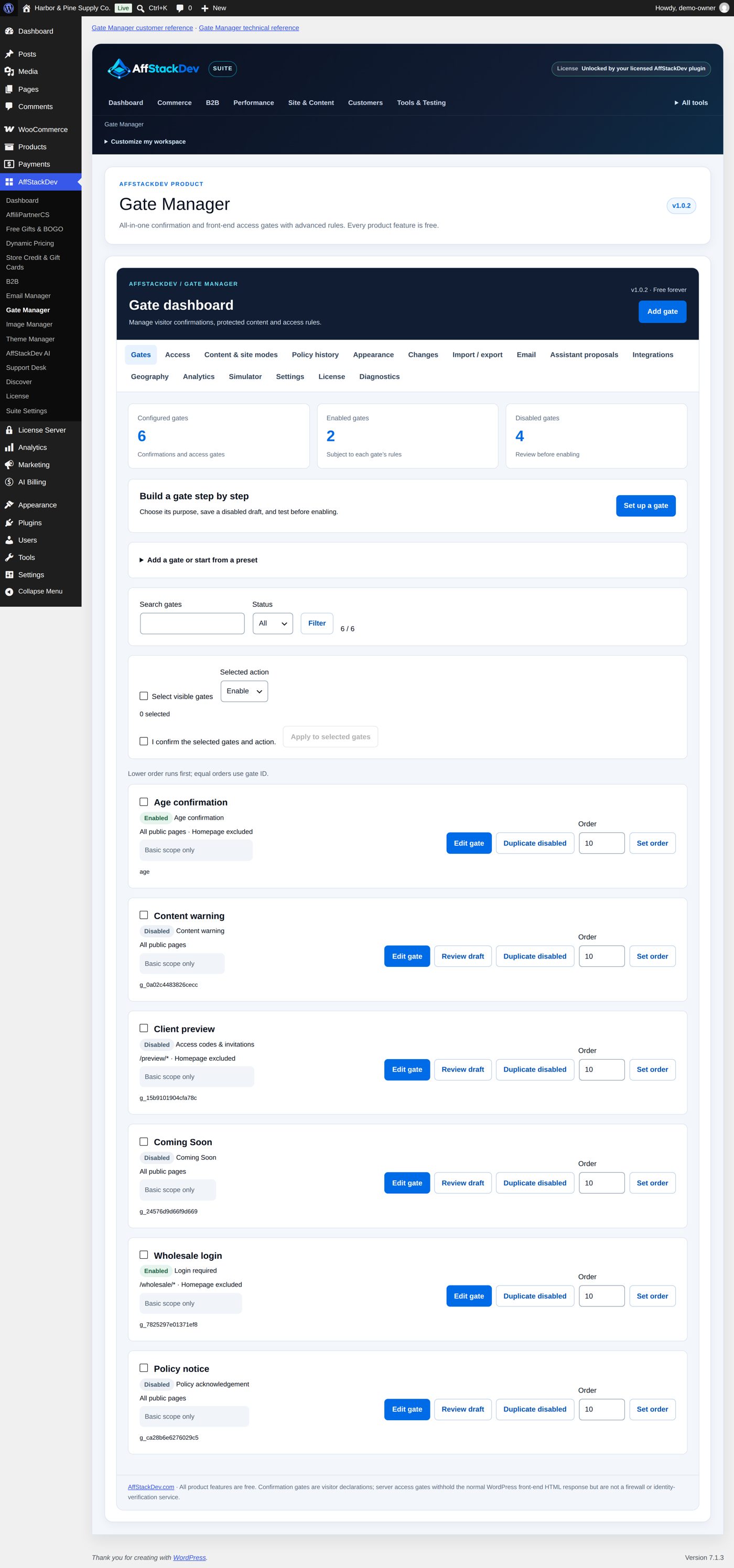
Gate Manager
Decide who sees what on your site: an age question, a members-only area, an invitation, a "coming soon" screen. Free.
What it does
A gate is a rule that stands between a visitor and a page. Gate Manager has fourteen kinds, in three families:
| Family | The visitor ... | Kinds |
|---|---|---|
| Confirmations | answers a question, then goes on | Age confirmation, Content warning, Policy acknowledgement, Custom confirmation, Visitor routing |
| Access requirements | must have something | Login required, Role restriction, Access codes & invitations, Email verification, Scheduled access, Recorded policy acceptance, Location eligibility |
| Site screens | sees a screen instead of the page | Coming Soon, Maintenance |
The difference matters. A confirmation is asked in the browser after the page has loaded: it is a declaration by the visitor, not a lock. An access requirement is checked on the server before the protected page or section is sent.
What you need
- WordPress 6.0 or newer and PHP 7.4 or newer.
- Optional: a free Gate Manager license from your AffStackDev account (it does not end). Gate Manager works fully without it; the license adds signed updates from affstackdev.com and counts for the full mode of AffStackDev Suite.
- WooCommerce only if you want gates that react to products, carts or customers.
Where it is
Settings → Gate Manager in the WordPress menu. With the Suite installed, Gate Manager moves into the AffStackDev menu (AffStackDev → Gate Manager) and the Settings entry is no longer shown; both open the same screens.
Gate Manager opens on the Gates tab. The tabs you will use first:
| Tab or button | For |
|---|---|
| Gates | The list of your gates, with a search and a status filter. Each one has Edit gate, Review draft (while it is off), Duplicate disabled and its Order number (Set order changes it). Tick several gates and use Selected action with Apply to selected gates to switch them on or off together. |
| Add gate (button) | Opens Set up a gate: choose a starting point (one of sixteen ready-made gates, or Start with a blank gate), configure a draft, test and review, enable. |
| Access | Codes, invitation links and visitors' requests for access. |
| Content & site modes | How to protect part of a page, how a launch (Coming Soon) or maintenance screen works, and what protection covers. |
| Appearance | Colors, logo and layout for all gates. |
| Simulator, Diagnostics | Try a visitor's situation and see which gate would act and why. |
| Settings | Four switches for the whole plugin, the uninstall choice, Download configuration JSON and the optional Spam check on visitor forms. |
| License | The optional free license: signed updates and the full mode of AffStackDev Suite. |
The other tabs (Policy history, Changes, Import / export, Email, Geography, Analytics) are explained where you need them. Two more: Integrations shows whether Gate Manager's saved configuration is readable and how it works alongside your other AffStackDev plugins (it checks access and never changes their records); Assistant proposals lists gate changes that an AI assistant prepared for you, waiting for your review before they affect visitors (it stays empty if you do not use one).