Fine-tune: what counts, what can be given, limits
The settings behind a promotion: which purchases count, which products may be gifts, buy-two-get-one repeated, a ladder of rewards, who may get a gift and how often, coupons, competing promotions, and every setting of the Settings tab. With worked examples.
Two separate questions
Free Gifts & BOGO keeps apart what earns a gift and what may be a gift.
- An expensive machine can count toward the gift and never be a gift itself.
- A small accessory can be a gift without its purchase counting.
So there are three places to exclude products:
| Where | The product ... |
|---|---|
| Exclude from qualifying purchases only, in 1. Customer must… (Purchases that do not count, Purchase categories that do not count) | does not count toward earning, but may be given as a gift |
| Exclude from gifts only, in 2. Customer gets… (Products never offered as gifts, Categories never offered as gifts) | cannot be a gift, but buying it counts. This holds for every reward level and for gifts added automatically. |
| 3. Exclusions and limits (Exclude products, Exclude categories, Exclude tags, Exclude product types, Exclude attributes or groupings), and the same lists on Settings for all promotions | neither counts nor can be a gift |
Excluding a category includes the categories below it. Picking a product excludes all its variations; you can also pick one exact variation.
What must be bought
- Customer earns the reward by Spending an amount (Amount to spend) or Buying a number of items (Number of items). Most kinds of deal fix this choice for you: Spend an amount, get a reward is about spending, the Buy products ... kinds are about items.
- Also require a minimum spend: for an items deal that should also need a cart amount ("Use this only when a quantity promotion should also require a cart amount."). Both must be met.
- Products that count: All products except exclusions, or Only selected products or groups, which opens Specific products, Product categories, Product tags, Attributes and groupings and Product types.
- Sale products, Virtual products and Downloadable products (under Advanced behavior and limits): Use global default, Allow or Exclude. On Settings all three are allowed at the start.
- Gift cards (AffStackDev Store Credit & Gift Cards): buying one does not count, unless Gift cards is ticked on Settings. A gift card is never a free gift.
What is given
Depending on the kind of deal, How the reward is chosen offers:
| Choice | Use it for |
|---|---|
| Add a specific product automatically | "Free tote bag with every order over 50": the product you pick under Gift product is added to the cart by itself. For a variable product, pick the exact variation. |
| Let the customer choose | The shopper picks from Customer can choose from: All eligible products, Only selected products or groups (you list them), or The same products or groups that count toward this deal. |
| Give the same product they bought | Buy two, get one of the same (BOGO). Each product or variation counts for itself. |
Number of gifts ("How many reward slots this promotion earns.") and the value limit go together: under Optional maximum gift value, tick Limit reward value and enter Maximum reward value. 2 gifts with a maximum of 20 means two products, each worth up to 20. It limits which products can be chosen; it is not an amount to spend.
Price used for the limit says what "worth" means: Current active price (a product on sale for 18 passes a limit of 20), Regular price (the same product at regularly 30 does not), or Use global default (Reward value basis on Settings, the current price at the start).
If a chosen gift is sold out or no longer allowed, it is taken out of the cart and the shopper can choose another. Free Gifts & BOGO never swaps in a different product by itself.
A gift at a discount
A gift does not have to be free. Under Gift price, Price of each gift offers Free (the start), A percentage off its price and An amount off its price, with the Discount under it. It works for every kind of deal, and every reward level of a ladder has its own (50% off from $100, free from $200, for example).
- The discount comes off the gift product's current price (its sale price while it is on sale). 50 means 50% off; an amount at or above the price makes the gift free.
- A percentage is rounded to the cent like a WooCommerce percentage coupon: 50% off a $9.99 product makes it $4.99.
- Coupons apply to the gift like to any product, store credit pays for it, and your tax settings apply. Whether coupons may be used with the promotion at all is still its Coupon coexistence.
- In the cart and in the order the gift is called "Gift at 50% off" (or "Gift at $5.00 off"); in a choice of gifts each one shows its price, such as "$4.99 (50% off)".
Worked example: socks at half price with every pair of boots
Harbor & Pine sells Trail Boots and wants to give Wool Camp Socks ($10) at half price with every pair:
| Field | Value |
|---|---|
| What kind of deal? | Buy products, get a specific product free (the price below makes it half price) |
| Number of items | 1 |
| Products that count | Only selected products or groups, Specific products: Trail Boots |
| Gift product | Wool Camp Socks |
| Price of each gift | A percentage off its price |
| Discount | 50 |
A shopper adds one pair of boots ($89): the socks are added as their own line at $5.00, labelled "Gift at 50% off"; the cart total is $94. The boots' product page says "Get 1 × Wool Camp Socks at 50% off". With the store's 10% code AUTUMN10 the boots cost $80.10 and the socks $4.50. When the socks go on sale at $8, the next cart update charges $4.00 for them.
Free shipping as the reward
Instead of a gift, a promotion can give free shipping: choose Give free shipping under How the reward is chosen (on a level of a ladder, Free shipping under Customer gets). Free Gifts & BOGO sets no shipping price itself; it uses WooCommerce's own Free shipping method.
- In WooCommerce → Settings → Shipping, add Free shipping to each zone where the promotion should give it, with Free shipping requires set to A valid free shipping coupon, A minimum order amount OR coupon or A minimum order amount AND coupon. While the cart reaches the promotion, the promotion counts as that coupon. With AND coupon, WooCommerce's minimum still applies.
- A Free shipping method that needs only a minimum amount, or nothing, works as before, and so do your other shipping methods and their prices. If no zone has a suitable Free shipping method, the editor says so under the choice.
- Free shipping is given once per order. The order lists the promotion with "Free shipping" (on the order screen under Gift promotions, and in the customer's order details and emails), campaign limits count it as one gift unit, and the reports count the order for the promotion.
Worked example: free shipping over $75
Harbor & Pine ships to the United States with Flat rate $7.95. Under WooCommerce → Settings → Shipping, in that zone, they add Free shipping with Free shipping requires: A valid free shipping coupon, then build the promotion "Free shipping over $75":
| Field | Value |
|---|---|
| What kind of deal? | Spend an amount, get a reward |
| Amount to spend | 75 |
| How the reward is chosen | Give free shipping |
A shopper with $64 in the cart sees only Flat rate $7.95, and the cart says "Add $11.00 more to unlock Free shipping over $75." They add a $15 beanie ($79): checkout now offers Free shipping at $0.00 next to Flat rate, and they choose it. The order has a Free shipping line at $0.00, and the order screen lists "Free shipping over $75: Free shipping" under Gift promotions. Had they removed the beanie before paying, Free shipping would have gone from the choices and Flat rate would have been chosen again. A customer who applies one of the store's own free shipping coupons gets free shipping from WooCommerce as before; the order then does not credit the promotion.
Getting it more than once
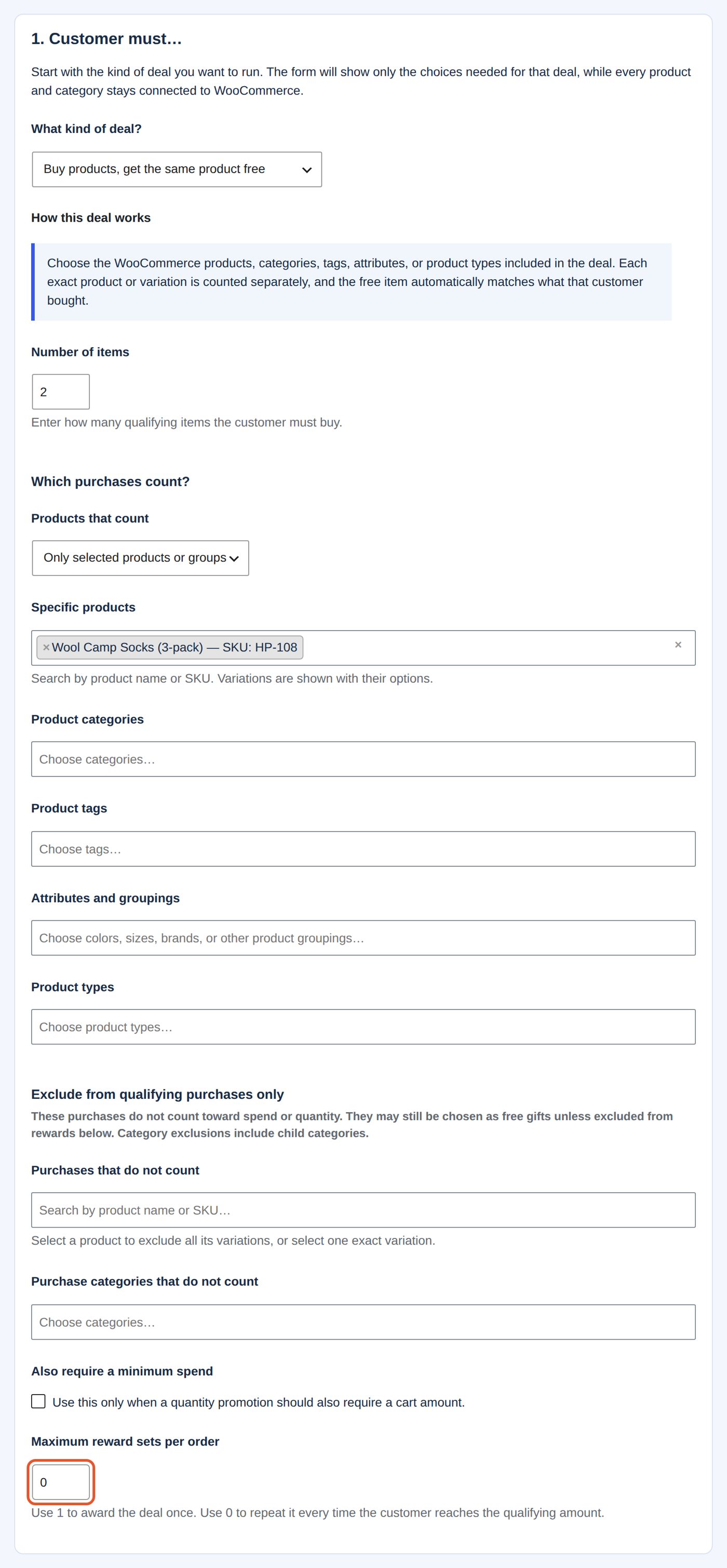
Maximum reward sets per order in 1. Customer must…: "Use 1 to award the deal once. Use 0 to repeat it every time the customer reaches the qualifying amount." A number above 1 caps the repeats.
Worked example: buy two packs, get one free, as often as the cart allows
Harbor & Pine's "Socks: buy two packs, get one free":
| Field | Value |
|---|---|
| What kind of deal? | Buy products, get the same product free |
| Number of items | 2 |
| Products that count | Only selected products or groups, Specific products: Wool Camp Socks (3-pack) |
| Maximum reward sets per order | 0 |
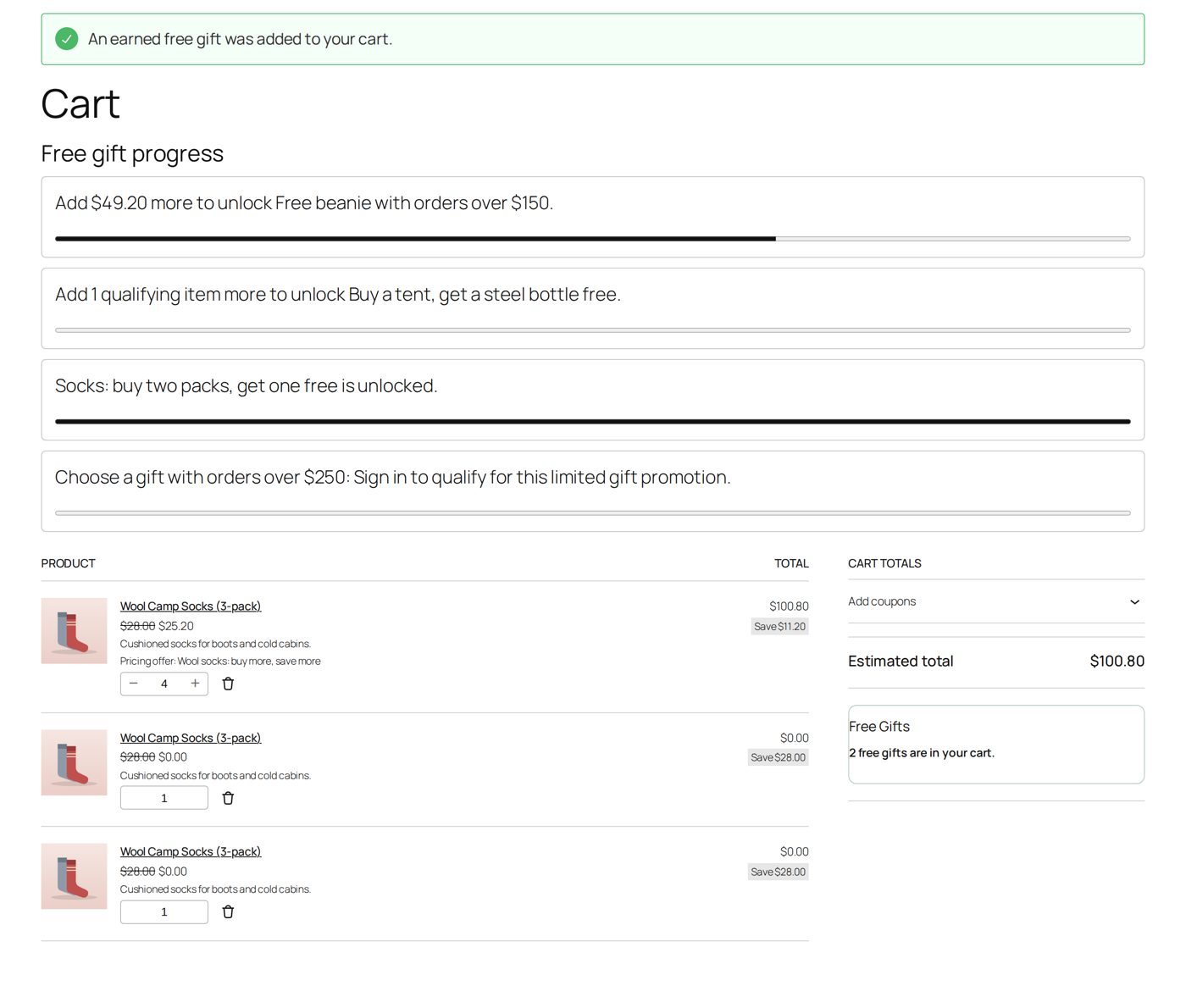
A shopper puts four packs in the cart: two packs more are added free ("An earned free gift was added to your cart."), each as a line of its own at $0.00 ("Save $28.00"). The paid packs cost $25.20 each instead of $28 here: the store's own Dynamic Pricing rule "Wool socks: buy more, save more" takes 10% off from three packs. The free packs count for nothing in the total ($100.80).
A ladder
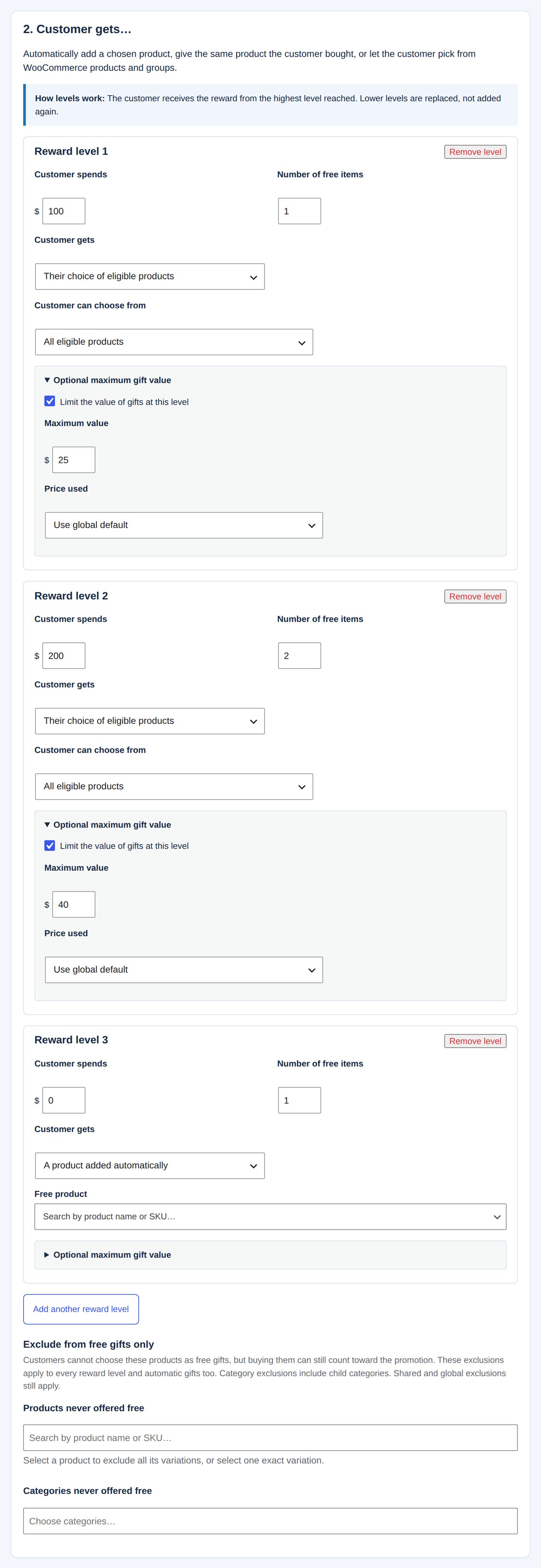
Spend or buy more, get different rewards. Under 2. Customer gets… each Reward level has its own Customer spends (or Customer buys this many), Number of gifts, Customer gets (A product added automatically or Their choice of eligible products), Customer can choose from and Optional maximum gift value (Limit the value of gifts at this level, Maximum value, Price used). "How levels work: The customer receives the reward from the highest level reached. Lower levels are replaced, not added again." A ladder has 2 to 20 levels: Add another reward level, Remove level. The editor always shows at least three level cards; a card you leave empty (spending 0) is not saved.
Worked example: bigger orders, better gifts
| Level | Customer spends | Number of gifts | Customer gets | Maximum value |
|---|---|---|---|---|
| Reward level 1 | 100 | 1 | Their choice of eligible products | 25 |
| Reward level 2 | 200 | 2 | Their choice of eligible products | 40 |
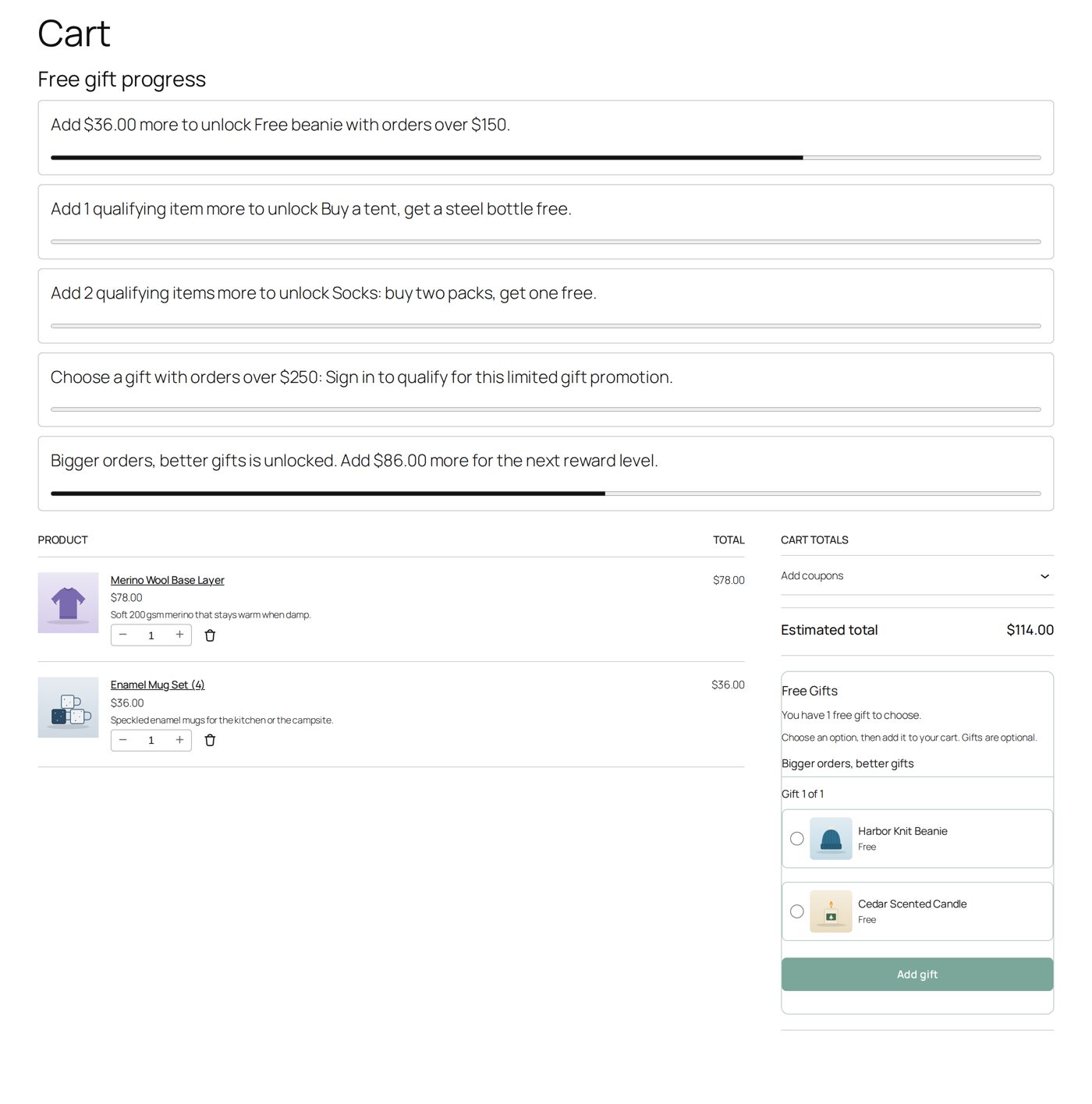
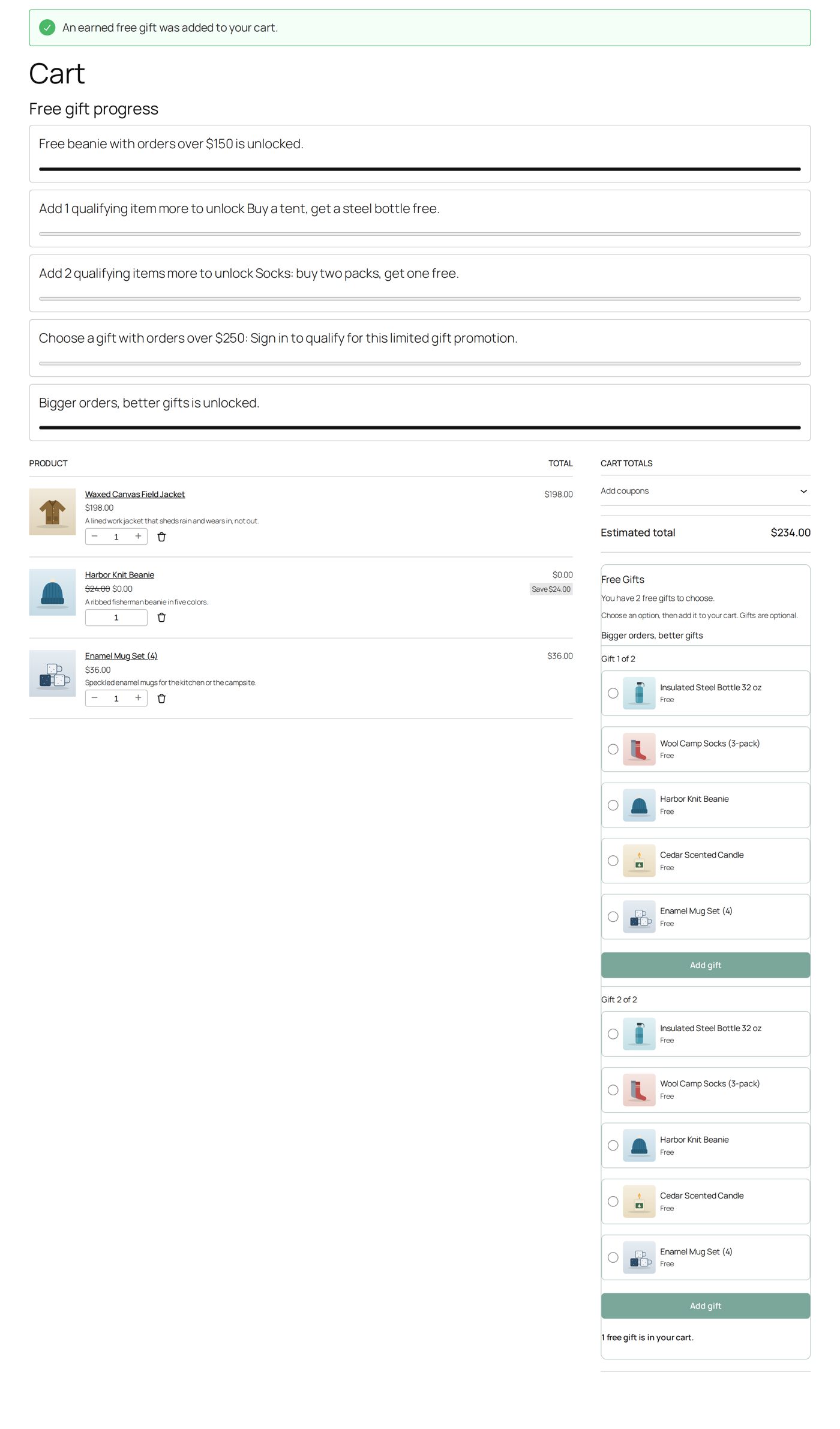
A cart of $114 (a base layer for $78 and a mug set for $36) reaches level 1: "Bigger orders, better gifts is unlocked. Add $86.00 more for the next reward level." The gift box offers one gift worth up to $25: the beanie or the candle.
A cart of $234 (a field jacket for $198 and the mug set) reaches level 2: "You have 2 free gifts to choose." Gift 1 of 2 and Gift 2 of 2 each offer the five products worth up to $40 (the steel bottle, the socks, the beanie, the candle and the mug set). Level 1's gift is not added on top. The store's "Free beanie with orders over $150" is a different promotion: it adds its beanie as well, because the two promotions combine.
Who, and how often
Under 3. Exclusions and limits, Customer targeting ("All selected conditions must match."):
| Field | Choices |
|---|---|
| Shopper access | All eligible shoppers, Guest checkout only, Signed-in customers only |
| Customer roles | Empty: any role. Picking roles requires sign-in; one matching role is enough. Hold Ctrl or Command to pick several. |
| Account purchase history | Any purchase history; No previous paid orders (a first-order gift: it also sets the promotion to one gift order per account); At least one previous paid order. These need sign-in and look at the account's orders that were paid, also when refunded or cancelled later. A guest's earlier purchases are not matched by email. |
Campaign limits (0 means no limit):
| Field | Counts |
|---|---|
| Orders across this campaign | orders with at least one gift from this promotion, however many gifts each has |
| Orders per signed-in customer | the same, per account; a limit above 0 requires sign-in |
| Gift units across this campaign | gift items given in all |
Counting starts when a limit is switched on; earlier orders are not counted afterwards, and changing a limit keeps what was used. An order waiting for payment holds its place; an unpaid order that fails or is cancelled gives it back; paid orders and refunds keep it. A cart alone holds nothing: availability is checked again at checkout. When a limit is set, the editor shows how much is used ("Allocated: ... orders, ... gift units.").
In the shop, a guest's cart says when a promotion needs sign-in, starting with the promotion's name (for example "Choose a gift with orders over $250: Sign in to qualify for this limited gift promotion."). The promotion's offer text adds its conditions ("Sign in; at most 1 order per account.").
Coupons
Under Advanced behavior and limits:
- Coupon coexistence: Use global/default policy (on Settings coupons are allowed at the start), Allow coupons, Do not combine with coupons. A promotion that does not allow coupons does not apply while a WooCommerce coupon is in the cart. Store credit and gift card codes are not counted as coupons here, and lower prices from a sale or from Dynamic Pricing are not coupons either.
- Coupon spend basis: whether a coupon lowers the amount that counts: Use global default (After coupon discounts at the start), Before coupon discounts, After coupon discounts.
Store credit and gift cards (AffStackDev Store Credit & Gift Cards) are payment, not coupons: they never lower the amount that counts and never block a promotion.
A gift through a coupon code
Under 3. Exclusions and limits, Coupon code, the field Only with these coupon codes takes one or more existing WooCommerce coupon codes, separated by commas. With codes there, the promotion counts only while one of them is in the cart; everything else the promotion asks for still has to match. Leave it empty (the start) for a promotion without a code.
- WooCommerce decides whether the code may be used: its expiry date, usage limits (in all and per customer), allowed email addresses and minimum spend all apply, and its own discount too. A coupon can discount nothing (a Fixed cart discount of 0) when the code should only unlock the gift.
- The promotion's own codes are not "a coupon" for its Coupon coexistence: a promotion set to Do not combine with coupons still applies with its own code, even one that takes 10% off. Any other coupon in the cart still stops it.
- Shoppers never see the code from Free Gifts & BOGO. The offer on product pages and on the promotions page says "With a coupon code only.", and the cart shows nothing for the promotion until one of its codes is applied. Give the code out yourself: in a newsletter, on a flyer, to a partner.
- Removing the code takes the gift away, as for any promotion the cart stops earning.
- The codes are kept as their coupons: renaming a coupon in WooCommerce keeps it in the promotion. A code that does not exist (or is not published) is not kept, and the promotion is saved disabled with "A code under Only with these coupon codes is not a published WooCommerce coupon." Store credit and gift card codes cannot be used.
Worked example: a tote bag for newsletter readers
Harbor & Pine's newsletter offers a free canvas tote with any order of $40 or more and the code TOTEFALL. First a coupon in Coupons: code totefall, Fixed cart discount, amount 0, Limit per customer 1 (WooCommerce's own coupon screen calls it Usage limit per user). Then the promotion:
| Field | Value |
|---|---|
| What kind of deal? | Spend an amount, get a reward |
| Amount to spend | 40 |
| Gift product | Canvas Tote |
| Only with these coupon codes | totefall |
| Coupon coexistence (under Advanced behavior and limits) | Do not combine with coupons |
A shopper with $52 of products sees no tote and no progress line. They type TOTEFALL in the cart: WooCommerce accepts the code (it takes nothing off), and the tote is added at $0.00. If they also type the store's 15% code AUTUMN15, the tote goes (the promotion does not combine with other coupons); removing AUTUMN15 brings it back. After the order, TOTEFALL is used up for that customer, so their next cart cannot use it and gets no tote.
The Promotion Preview has Coupon codes applied for this: type totefall to see the promotion earn the tote; without it the result says "This promotion counts only while one of its coupon codes is applied."
Coupons in the same place
The Coupons area lists your ordinary WooCommerce coupons (All, Enabled, Disabled, Trash; 20 a page) with their code, discount, status, uses and expiry. New basic coupon and Basic edit cover the everyday fields: code (left empty, one is made for you), discount type (percentage, fixed cart, fixed product), amount, an internal note, expiry date, minimum and maximum spend, total and per-customer use limits, Enabled, and Do not combine with other coupons. For anything else (product or email restrictions, for example) use WooCommerce's own coupon editor; it is the same coupon.
When two promotions match the same cart
Each promotion has an Evaluation order number: smaller numbers win when promotions compete, and with equal numbers the older promotion wins. Combine with other gift promotions? (under Advanced behavior and limits) decides whether a promotion is given together with others (Yes — combine with other promotions) or competes (No — make this promotion compete); Use the store default follows Default promotion combining on Settings (Combine promotions by default at the start). Competing promotions with the same Competition group (optional) compete only with each other: the first one earned (smallest number) wins. A competing promotion without a group competes with every other promotion. The order is yours, not "the most valuable gift".
Business customers
If you also run AffStackDev B2B: business accounts (waiting, approved or on hold) do not get consumer gifts, also when their business discount is zero. They see no gift box at all.
Every setting on the Settings tab
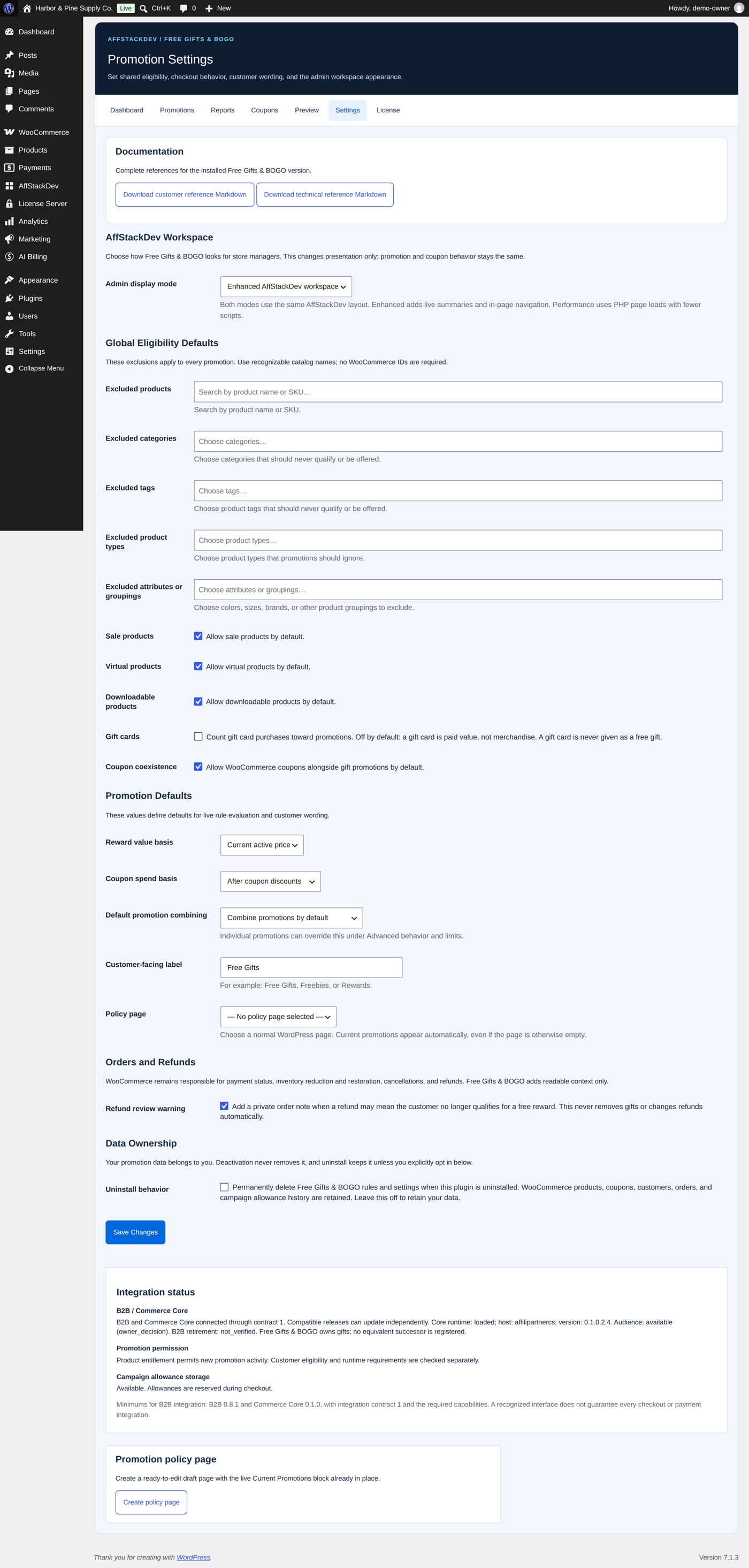
| Setting | At the start | What it does |
|---|---|---|
| Admin display mode | Enhanced AffStackDev workspace | Performance / PHP pages loads ordinary pages with fewer scripts; both keep the same layout and save the same promotions. |
| Excluded products, Excluded categories, Excluded tags, Excluded product types, Excluded attributes or groupings | empty | Products that never count toward a promotion and are never given, in every promotion. |
| Sale products, Virtual products, Downloadable products | allowed | Whether such products count by default; each promotion can follow or override it. |
| Gift cards | off | "Count gift card purchases toward promotions." A gift card is never given as a free gift. |
| Coupon coexistence | on | "Allow WooCommerce coupons alongside gift promotions by default." |
| Reward value basis | Current active price | The price a gift's maximum value is measured against (or Regular price). |
| Coupon spend basis | After coupon discounts | Whether coupons lower the amount that counts. |
| Default promotion combining | Combine promotions by default | What Use the store default means in a promotion (or Do not combine promotions by default). |
| Customer-facing label | Free Gifts | The heading of the gift box in the cart and at checkout ("For example: Free Gifts, Freebies, or Rewards."). |
| Policy page | none | The page that lists the current promotions; Create policy page makes a draft for you (Telling shoppers about the offer). |
| Refund review warning | on | A private order note when a refund may mean the customer no longer qualifies (A refund). |
| Uninstall behavior | off | When ticked, deleting the plugin also deletes its promotions and settings. WooCommerce products, coupons, customers, orders and the campaign usage history always stay. |
Below the settings, B2B / Commerce Core shows whether the license allows promotions (Promotion permission), whether campaign limits can be counted (Campaign allowance storage; if not, limited promotions give no gifts until your host fixes the database table) and whether B2B is connected (Integration status).