AffiliPartnerCS
A partner program for your store: partners apply, you give them plans, coupons and affiliate links, they earn commissions on the sales they bring, and you pay them in reviewed batches. What it does, how the parts fit together, and where everything is.
What it does
AffiliPartnerCS runs a partner program inside WooCommerce. Partners are clubs, blogs, podcasts, forums or creators who send you customers:
- Partners apply on your program page. You review each application and approve it into a partner record (Applications).
- Partner Plans say what the partner's customers save and what the partner earns, for example "15% off for the reader, 8% commission for the partner" (Partners, plans and coupons).
- Coupons and affiliate links connect a sale to the partner who brought it. A coupon is an ordinary WooCommerce coupon; an affiliate link remembers the partner in the visitor's browser for 30 days at the start (Links, attribution and commissions).
- Commissions are worked out per order from the merchandise after discounts, wait until the order is Completed, then wait out an adjustment hold (30 days at the start) during which refunds still reduce them.
- Payouts gather each partner's payable commissions into batches on your schedule. You pay each batch yourself, by the partner's method: Venmo, Cash App, Zelle, bank wire, prepaid card or check outside the plugin, then Mark Paid; PayPal or Stripe through your own provider account; or store credit in your shop (Payouts).
- Partners have their own workspace under My Account: their codes and links, results, commissions, payouts, payout details, messages to you (The partner's workspace and more).
It also covers member pricing for online communities (a member signed in to the partner's forum gets the member price), landing pages that credit a partner without a link, the partner's coupon applied by itself through its links, lifetime customers, an email to the partner for each new commission, advanced commission rules, bonuses, automatic tiers, a multi-tier network, tax tracking, partner teams and staff roles.
How a partnership runs, start to finish
- A club fills in the application on your Partner Program page.
- You read it under Applications and choose Approve & Create Partner. AffiliPartnerCS creates the partner record.
- On the partner record you link the club's store account, give it plans (Programs), and on Codes & Coupons a coupon such as
TRAILHEAD15. With an affiliate plan the partner also has an affiliate link. - A reader buys with the coupon or after following the link. The order is credited to the partner and a commission appears under Commissions: Pending Order Delivery.
- You mark the order Completed. The commission waits out the Commission Adjustment Hold: a refund in that time reduces it.
- After the hold the commission is Pending Payout. On your payout day AffiliPartnerCS makes a batch for every partner whose balance reaches the minimum.
- You pay the batch and record it. The partner sees the payment in their workspace.
The sample store of these pages
The pictures come from Harbor & Pine Supply Co., a made-up shop for outdoor gear and home goods running on a test site. Its program has three plans and six partners:
| Partner | Contact | Coupon | Paid by |
|---|---|---|---|
| Trailhead Journal (a hiking blog) | Nora Whitaker | TRAILHEAD15 | Venmo |
| Northwoods Paddling Club | Owen Marlow | NORTHWOODS15 | check |
| Campfire Collective (a camping community) | Priya Raman | CAMPFIRE15 | Zelle |
| Summit Stories Podcast | Leo Hartmann | SUMMIT15 | Zelle |
| Lakeshore Guide Service | Maya Fontaine | LAKESHORE15 | Venmo |
| Backcountry Gear Notes (a review site) | Theo Lindgren | BACKCOUNTRY15 | Zelle |
Every partner has the plan Creator coupon: 15% off, 8% commission for its coupon and Affiliate: 10% commission for its affiliate link. A third plan, Club member pricing: 20% off, is for member pricing. Three applications wait for review: Granite State Hiking Club, Paddle & Portage Weekly and Cedar Ridge Scout Troop 214.
What you need
- WordPress 6.9 or newer, PHP 7.4 or newer, WooCommerce 10.0 or newer. Keep WooCommerce active, or the workspace does not start.
- An AffiliPartnerCS license (Activate your license). Without one (after the first 72 hours) sales through partners' links still keep their partner, and their commissions appear once the license is active.
- For store credit payouts: AffStackDev Store Credit & Gift Cards.
- For PayPal or Stripe payouts: your own PayPal Payouts or Stripe Connect account (Payouts).
- For member pricing: a partner community on Discourse (self-hosted or hosted) or XenForo that can install the connector AffiliPartnerCS provides.
Where it is
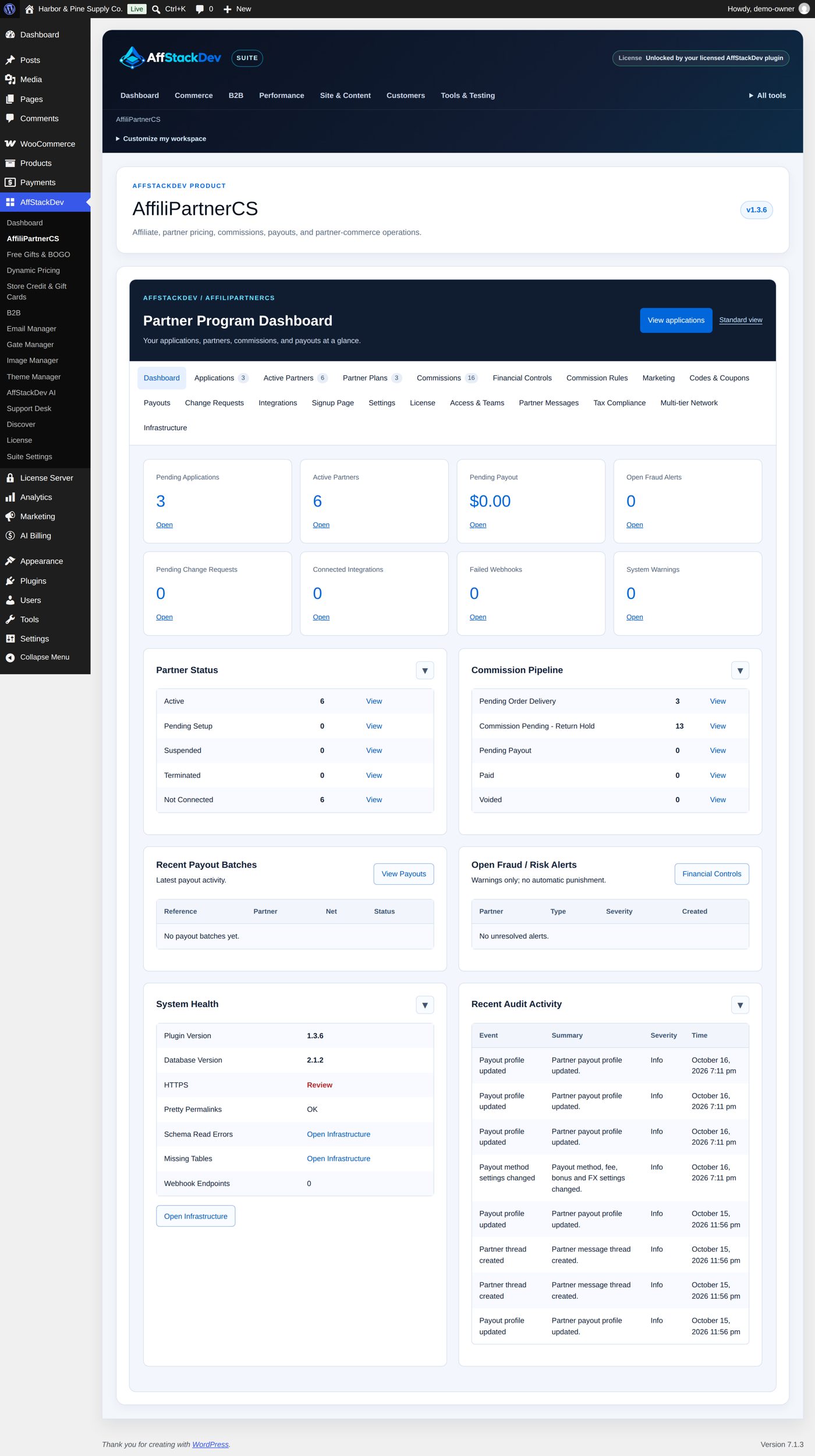
AffiliPartnerCS in the WordPress menu, or AffStackDev → AffiliPartnerCS with the AffStackDev Suite. The workspace has these tabs:
| Tab | For |
|---|---|
| Dashboard | Pending applications, active partners, the pending payout amount, warnings, the commission pipeline, recent batches and activity. |
| Applications | Requests to join, and your decision on each. |
| Active Partners | Every partner record (all statuses, despite the name), and Add Partner Manually. |
| Partner Plans | The discount and commission terms you reuse. |
| Commissions | The ledger: every commission and where it stands. |
| Financial Controls | Corrections while the hold is open, adjustments, chargebacks, unusual-activity checks, bonuses and automatic tiers. |
| Commission Rules | Other rates for chosen products, categories or plans. |
| Marketing | How long a referral counts, promotional material, the partners' saved links. |
| Codes & Coupons | Each partner's coupons, affiliate code and link. |
| Payouts | Payout methods, PayPal and Stripe connections, balances, batches. |
| Change Requests | Partners' requests to change their public profile. |
| Integrations | Connections to partner communities for member pricing. |
| Signup Page | The public program page, the application form and its emails. |
| Settings | Program settings, emails, hold, payout schedule. |
| License | The license. |
| Access & Teams, Partner Messages, Tax Compliance, Multi-tier Network, Infrastructure | Screens of their own, linked at the end of the tab bar: staff roles and partner teams, conversations with partners, tax tracking, partners who refer partners, system status, exports and maintenance. |
Who on your staff may do what
Administrators and shop managers have every AffiliPartnerCS permission. You can give other staff a narrower role under Access & Teams → Store Staff Access (details):
| Role | Can |
|---|---|
| AffiliPartnerCS Manager | Everything in the plugin. |
| AffiliPartnerCS Finance | Financials, payouts, partner messages, exports and the audit log. |
| AffiliPartnerCS Support | Read the program and answer partner messages. |
| AffiliPartnerCS Analyst | Read the program, export, read the audit log. |
| AffiliPartnerCS Integrations | Community connections, webhooks, authentication keys and the audit log. |
These staff roles do not make anyone a partner, and a partner's login gives no access to your WordPress admin.
The pages of this part
| Page | What it covers |
|---|---|
| Getting started | Install, license, every program setting, the public program page and a first test. |
| Applications | The program page and its application form, reviewing, approving, asking for more information, the application emails. |
| Partners, plans and coupons | Partner records section by section, adding a partner by hand, plans, coupons, suspending and deleting. |
| Links, attribution and commissions | Which partner gets a sale, affiliate links, how much a partner earns, holds and refunds, rules, corrections, bonuses and tiers. |
| Payouts | Payout methods, the schedule, batches, paying and recording, store credit, PayPal and Stripe, currencies, tax. |
| The partner's workspace and more | What partners see and do under My Account, change requests, messages, teams, member pricing, staff roles, exports and maintenance. |