Links, attribution and commissions
Which partner gets a sale, affiliate links and their settings, how much a partner earns, the adjustment hold, refunds, the Commissions screen, commission rules, corrections, unusual-activity checks, bonuses, automatic tiers and the multi-tier network, with worked examples and real numbers.
Which partner gets the sale
AffiliPartnerCS credits an order to one partner. It looks in this order and takes the first that applies:
- the shopper's current verified partner session (member pricing through a partner community),
- the first usable partner coupon on the order,
- the shopper's affiliate link referral that is still counting (a visit to a partner's landing page counts the same),
- with lifetime customers switched on: the partner who brought this customer before.
A higher one wins even when another partner's link was followed before. With the partner's coupon through their links switched on, a link visitor's cart holds the partner's coupon, so such a sale counts under 2. Suspended, disabled, rejected and terminated partners get no new sales. An order keeps the partner, plan and rate it was credited with; later visits or plan changes do not move it.
A partner buying through their own affiliate link earns nothing: the sale is not credited when the buyer's login or billing email is the partner's own, and the attempt is listed under Financial Controls → Open Fraud / Risk Alerts.
Partner coupons are consumer offers. A business customer of AffStackDev B2B (approved or waiting for approval) gets no partner discount, and a cart with a licensed product gets none either; WooCommerce answers that the coupon is not valid. Because of the same check, a partner coupon cannot be added to an order you create yourself on WooCommerce's order screen: credit such an order with Manual Order Attribution / Correction (Corrections).
Sales keep counting while the AffiliPartnerCS license is on hold: an order that came through a partner's affiliate link still gets that partner, and its commission appears once the license is active again (the hold of a completed order counts from its completion date; a cancelled, failed or refunded order gets none). Partner coupons are refused during a hold, and orders you create yourself on WooCommerce's order screen are credited only while the license is active.
Affiliate links
A partner needs Enable affiliate links for this partner and an enabled Affiliate Plan (Partners, plans and coupons). Its basic link leads to your home page with ?mpp_ref= and its Affiliate ID; it is on Codes & Coupons. Partners make links to any page of your store in their workspace, with a campaign name and a sub-ID to tell their placements apart, and can save a link as a short address /partner-go/.../.
When a visitor opens such a link, AffiliPartnerCS counts the click, remembers the partner in the visitor's browser (a cookie) and forwards to the page without the tracking part. The referral counts for the Affiliate Window and ends with the visitor's first paid order.
Marketing settings
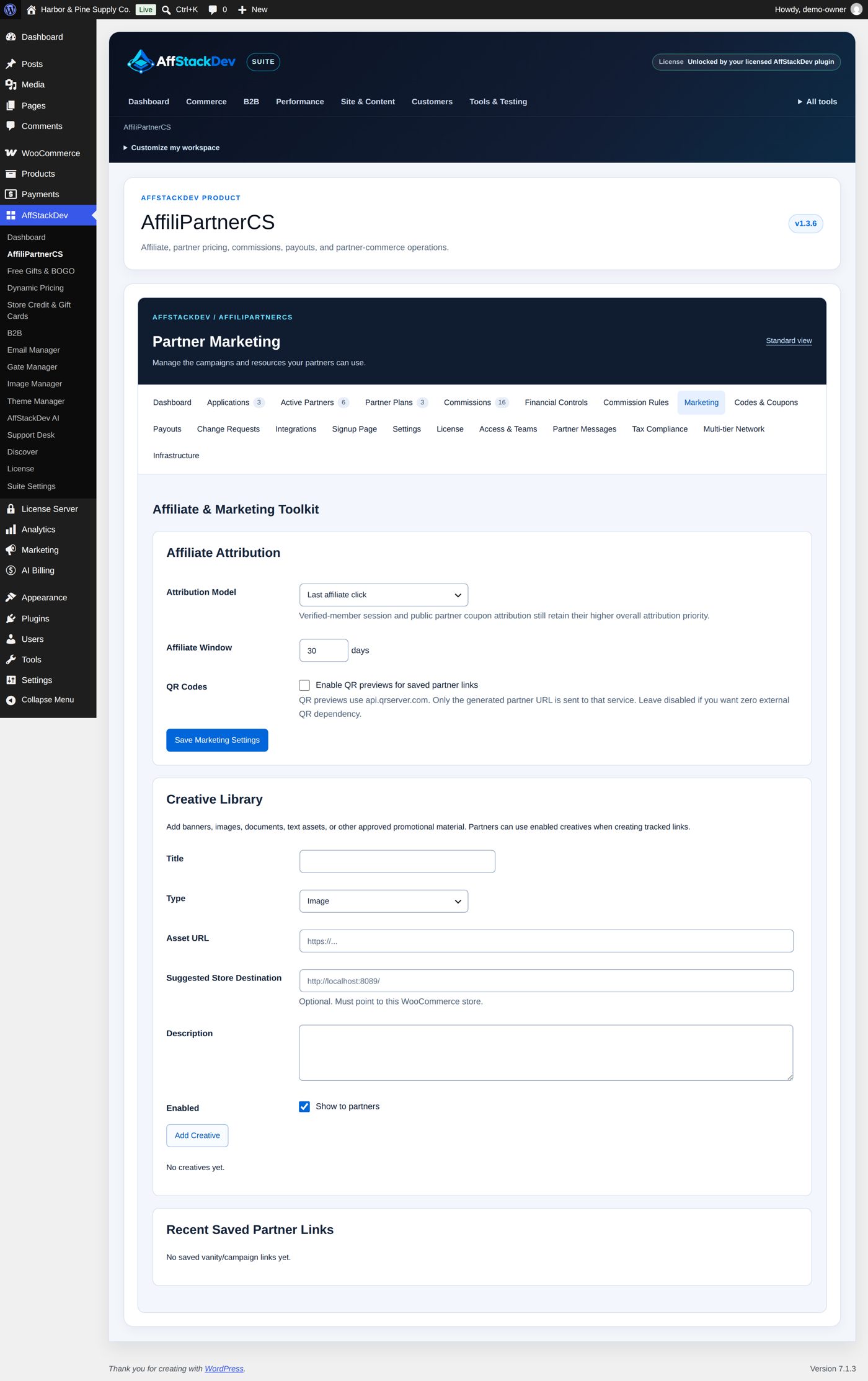
Marketing → Affiliate Attribution:
| Field | At the start | What it does |
|---|---|---|
| Attribution Model | Last affiliate click | With two partners' links in one browser: Last affiliate click gives the sale to the later one; First affiliate click keeps the first until its window ends. Member pricing and partner coupons stay ahead of both. |
| Affiliate Window | 30 days (1 to 365) | How long a referral counts. One setting for every partner. |
| Partner Discount Through Links | not ticked | A shopper who arrives through a partner's link or landing page gets the partner's coupon in the cart by itself (below). |
| Lifetime Customers | not ticked | The partner who brought a customer is credited with that customer's later orders that nothing else credits (below). |
| Lifetime Length | 0 days (no end) | How long a customer stays a partner's lifetime customer, counted from the first order; 0 to 3,650. |
| QR Codes | not ticked | Enable QR previews for saved partner links: shows a QR picture next to each saved link. The pictures come from api.qrserver.com, which then sees the link. |
Save Marketing Settings saves them: "Marketing settings updated."
Creative Library holds banners and texts for partners: Title, Type (Image, Banner, Text, Document, Other), Asset URL (where the file is), Suggested Store Destination (a page of your store), Description, Enabled (Show to partners), then Add Creative. Partners choose an enabled creative when they make a link, so its orders show under the creative. Delete removes a creative; the file itself stays where it is.
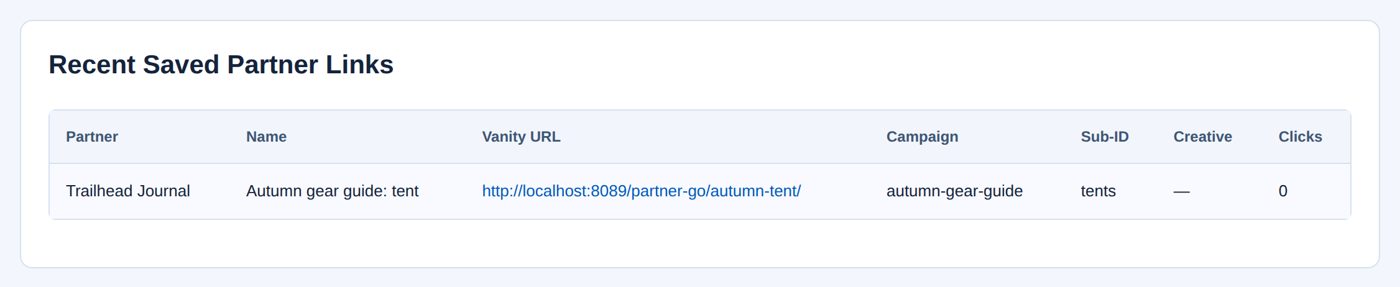
Recent Saved Partner Links lists the partners' saved links with Partner, Name, Vanity URL, Campaign, Sub-ID, Creative and Clicks.
Worked example: a referral counts 45 days
Harbor & Pine's partners write gear guides that readers come back to weeks later, so referrals should count longer than 30 days.
- Marketing → Affiliate Attribution: Attribution Model Last affiliate click, Affiliate Window 45.
- Save Marketing Settings: "Marketing settings updated."
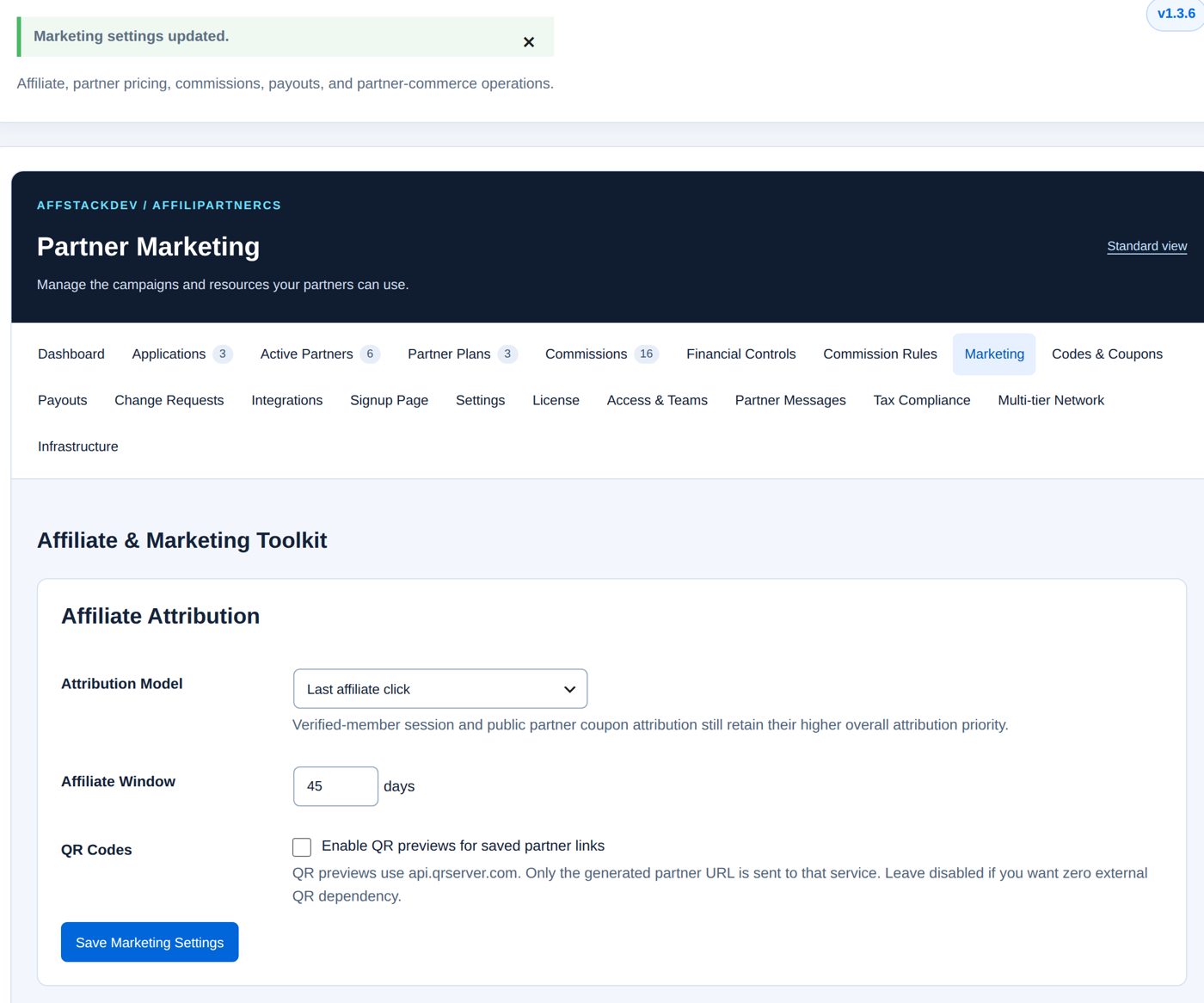
Every partner's Affiliate section now shows the window, and the partners' workspace says "Up to 45 days / one paid order". Referrals made before the change keep the end date their cookie already has.
Worked example: Nora's link to the tent
Nora Whitaker writes Trailhead Journal's autumn gear guide and wants a link to the Ridgeline 2-Person Tent that she can tell apart from her other links.
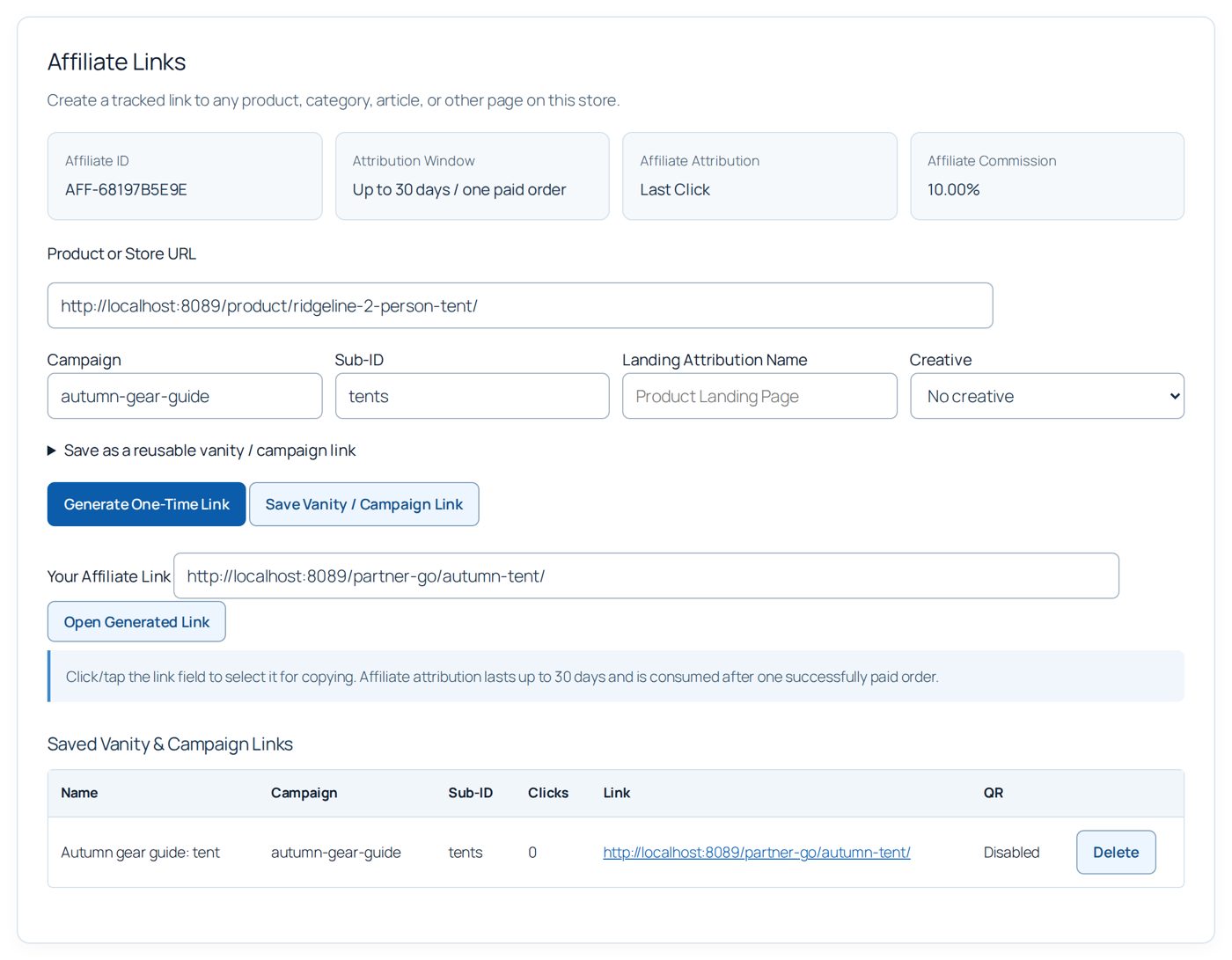
- Signed in, she opens My Account → AffiliPartnerCS → Affiliate Links. The cards show her Affiliate ID, the Attribution Window, the attribution model and her Affiliate Commission (10.00%).
- Product or Store URL: the tent's page; Campaign
autumn-gear-guide; Sub-IDtents.
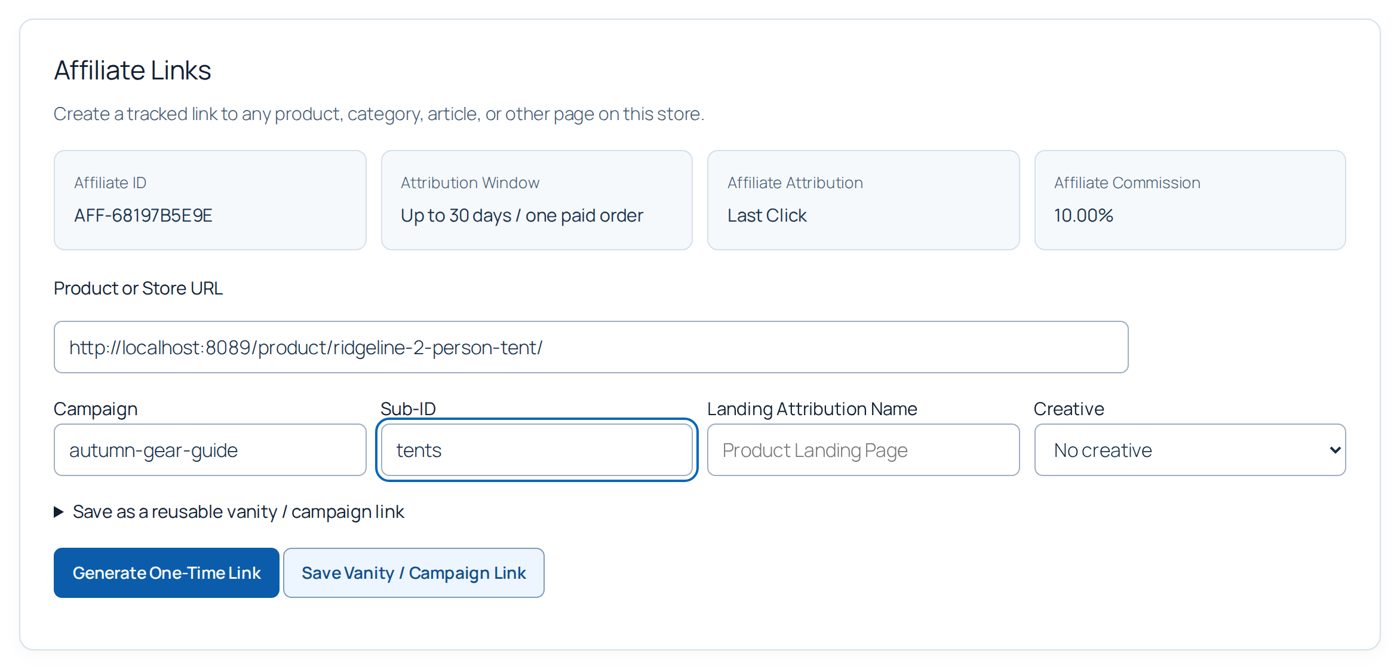
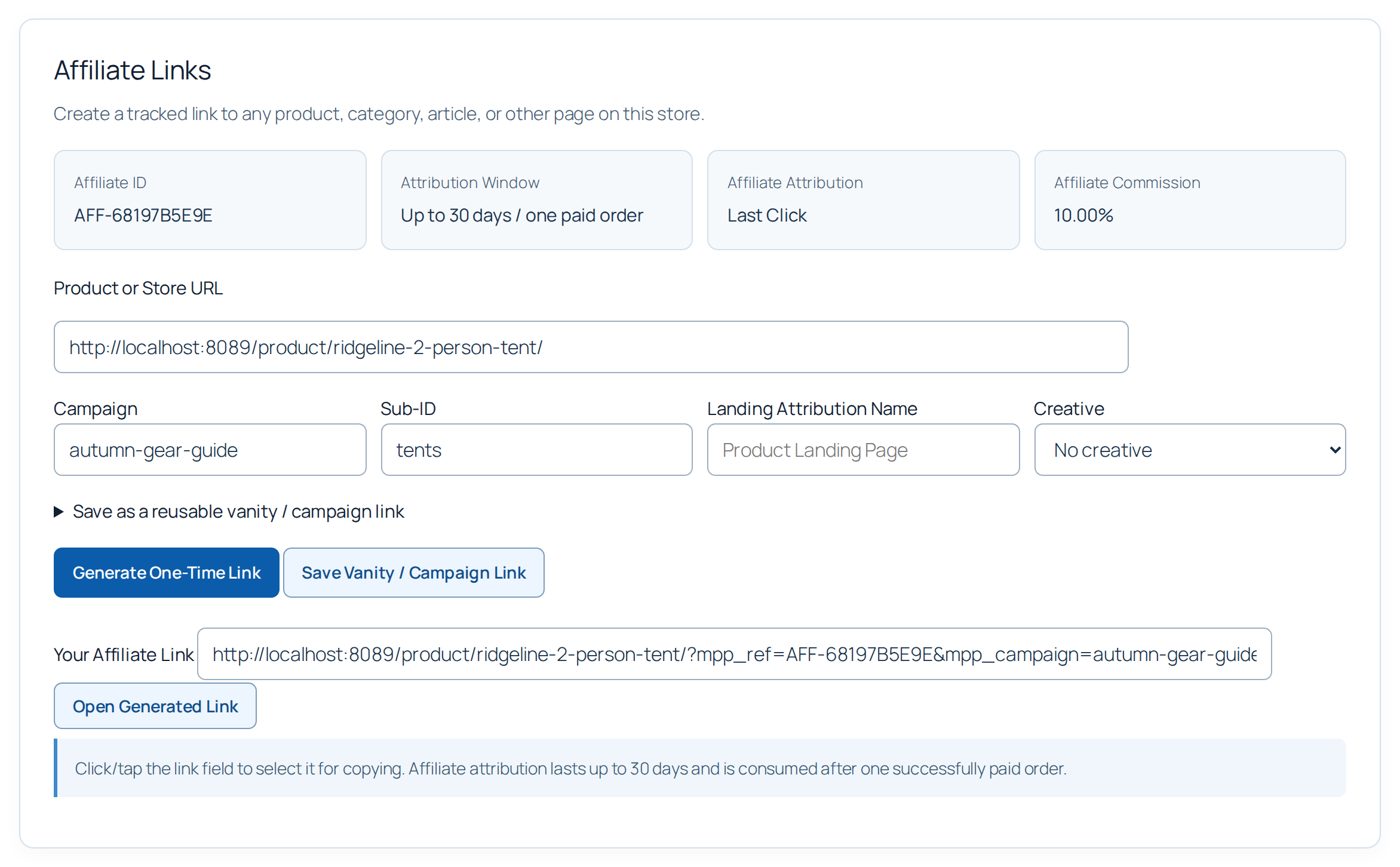
- Generate One-Time Link: Your Affiliate Link shows the tent's address with
?mpp_ref=AFF-...&mpp_campaign=autumn-gear-guide.... A click in the field selects it for copying; Open Generated Link tries it.
- For a shorter link she opens Save as a reusable vanity / campaign link, enters Link Name Autumn gear guide: tent and Vanity Slug
autumn-tent, and chooses Save Vanity / Campaign Link. Her link is now/partner-go/autumn-tent/, listed under Saved Vanity & Campaign Links with its clicks.
The store sees the link under Marketing → Recent Saved Partner Links:
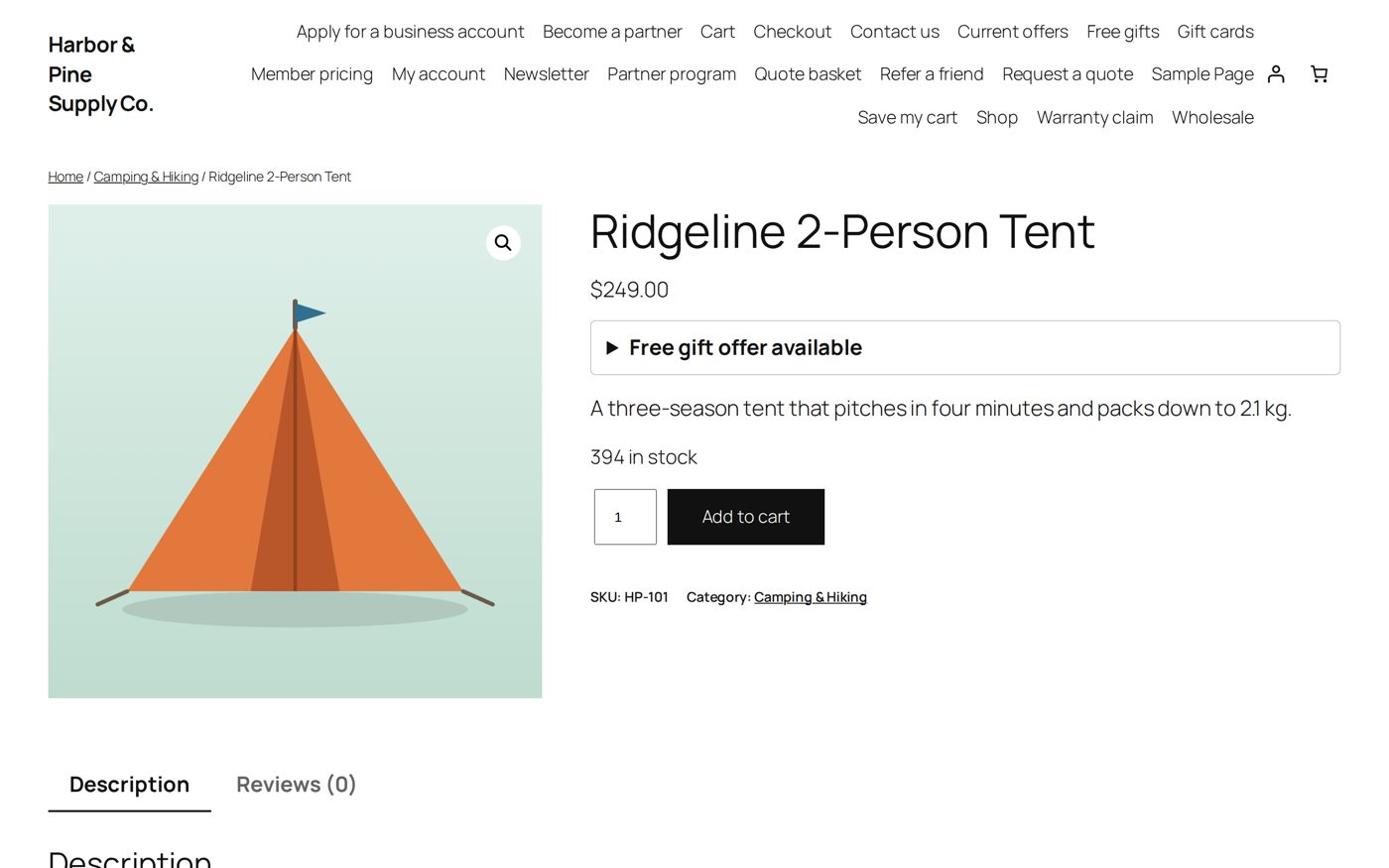
A reader who follows it lands on the tent's page; the address shows no tracking part, and Trailhead Journal is remembered for that browser:
If the reader buys within the window (and uses no other partner's coupon), the order is credited to Trailhead Journal at its affiliate rate, 10%, and shows the campaign and sub-ID on the order.
Landing pages
A landing page credits a partner without any link or code: every visit to the page counts as a visit through that partner's affiliate link. It suits a partner who cannot pass on a link, such as a podcast host who reads an address out on air.
- Make the page as any page of your site.
- Marketing → Partner Landing Pages: choose the Page and the Partner, then Make Landing Page. Only partners with affiliate links on and an enabled affiliate plan are listed.
The visit then works like the partner's link: the same window and first-click or last-click rule, one click counted, the sale credited at the partner's affiliate rate. The order's Landing Attribution shows landing-page- and the page's address name. A visit through any partner's link just before (two minutes) is kept, so a link that leads to another partner's landing page credits the link's partner. Pages your host serves from its cache count too.
A page belongs to one partner; Remove it to give it to another. Your shop, cart, checkout, account and terms pages, your front page and the partner program pages cannot be landing pages: every visitor of them would be credited to one partner. Credits Visits says Yes, or why not (the page is not published, or the partner cannot be credited right now). The partner sees its landing pages in its workspace under Your Landing Pages, and you see them on the partner record under Affiliate Links.
Worked example: Summit Stories Podcast's landing page
Leo Hartmann reads Harbor & Pine's sponsor message on Summit Stories Podcast. Listeners cannot click a link in an audio show, so Harbor & Pine makes the page Summit Stories listeners at /summit/ with the gear Leo talks about.
- Marketing → Partner Landing Pages: Page Summit Stories listeners, Partner Summit Stories Podcast, Make Landing Page. The list shows the page with Credits Visits Yes.
- Leo says "harborandpine.example/summit" in the show.
- A listener types it, opens the page and buys a $120 rain jacket. The order is credited to Summit Stories Podcast at its affiliate rate: 10% of $120, $12.00, with Landing Attribution
landing-page-summit.
The partner's coupon through their links
With Partner Discount Through Links ticked, a shopper who arrives through a partner's link or landing page gets the partner's coupon in the cart by itself as soon as the cart has an item. Nobody types a code.
- It needs a partner coupon (Codes & Coupons) with an enabled Coupon Plan. A partner without one gives no discount; its link credits the sale as before.
- The sale then counts as a coupon sale, exactly as if the code had been typed: the coupon plan's discount for the shopper and its commission for the partner. The order keeps the link's campaign and sub-ID, and the sale counts for the link in the partner's campaign and saved-link figures.
- The coupon's own limits still apply (minimum spend, products, usage limits), and so does the rule that partner coupons are for consumers only. When the coupon does not apply, the shopper sees no message about it.
- Member pricing and a partner coupon already in the cart come first. A shopper who removes the coupon does not get it back during that visit.
Worked example: with the switch ticked, a reader follows Nora's link to the Ridgeline tent ($200). TRAILHEAD15 is in the cart by itself, so the reader pays $170 and Trailhead Journal earns its coupon plan's 8% of $170, $13.60. Without the switch the reader pays $200 and Trailhead Journal earns its affiliate rate, 10% of $200, $20.00. Choose the switch for what your program should give: a discount for the reader, or the higher affiliate commission for the partner.
Lifetime customers
With Lifetime Customers ticked (Marketing → Affiliate Attribution), a partner keeps earning on the later orders of the customers it brought.
- A customer becomes a partner's lifetime customer when an order credited through the partner's link, landing page or coupon is paid (Processing or Completed). The customer is recognized by store account and by billing email, so guest orders count too.
- A later order of that customer that no member pricing, partner coupon or affiliate link credits goes to that partner, at the partner's current rate for the kind of sale that brought the customer (affiliate plan for a link or landing page, coupon plan for a coupon). The customer gets no discount from it. The order's Attribution reads Lifetime Customer.
- Another partner's coupon or link still wins its order, and the customer stays with the first partner.
- Lifetime Length ends the link after that many days (0: no end); then the next partner who credits an order of the customer gets the customer.
- The link goes when its first order is refunded in full, cancelled or fails. On the partner record, Affiliate Links → Lifetime Customers lists them with Remove. A partner's own store account never becomes its lifetime customer.
The partner sees how many lifetime customers it has, never who they are. Turning the switch off keeps the links but credits nothing and makes no new ones until it is ticked again. WordPress's personal-data export shows a customer's link, and erasing the customer's data removes it.
Worked example: the tent buyer comes back
Harbor & Pine ticks Lifetime Customers with Lifetime Length 365 days.
- In March a reader follows Nora's link, buys the Ridgeline tent for $200 and pays. Trailhead Journal earns 10%, $20.00, and the reader becomes its lifetime customer; the order notes say so.
- In July the same reader comes back by typing the shop's address and buys a $40 pair of hiking socks. No link, no coupon: the order is credited to Trailhead Journal as Lifetime Customer at its affiliate rate, 10%, $4.00.
- In August the reader uses Campfire Collective's coupon CAMPFIRE15 on a $100 lantern. Campfire Collective gets that order (8% of $85, $6.80); the reader stays Trailhead Journal's lifetime customer until next March.
How much a partner earns
The base is the order's merchandise after discounts and before tax. Shipping and fees do not count. Free gifts count with what was paid for them: nothing.
- Commission type Percentage: the plan's rate of the base.
- Commission type Fixed Amount Per Qualifying Order: the amount once per order, whatever the number of items, as long as some merchandise is left.
- Store credit is payment, not a discount: if the customer pays part with AffStackDev Store Credit, that part still counts: a $49 product with a 10% coupon (4.90 off) and $20 of store credit gives a base of $44.10.
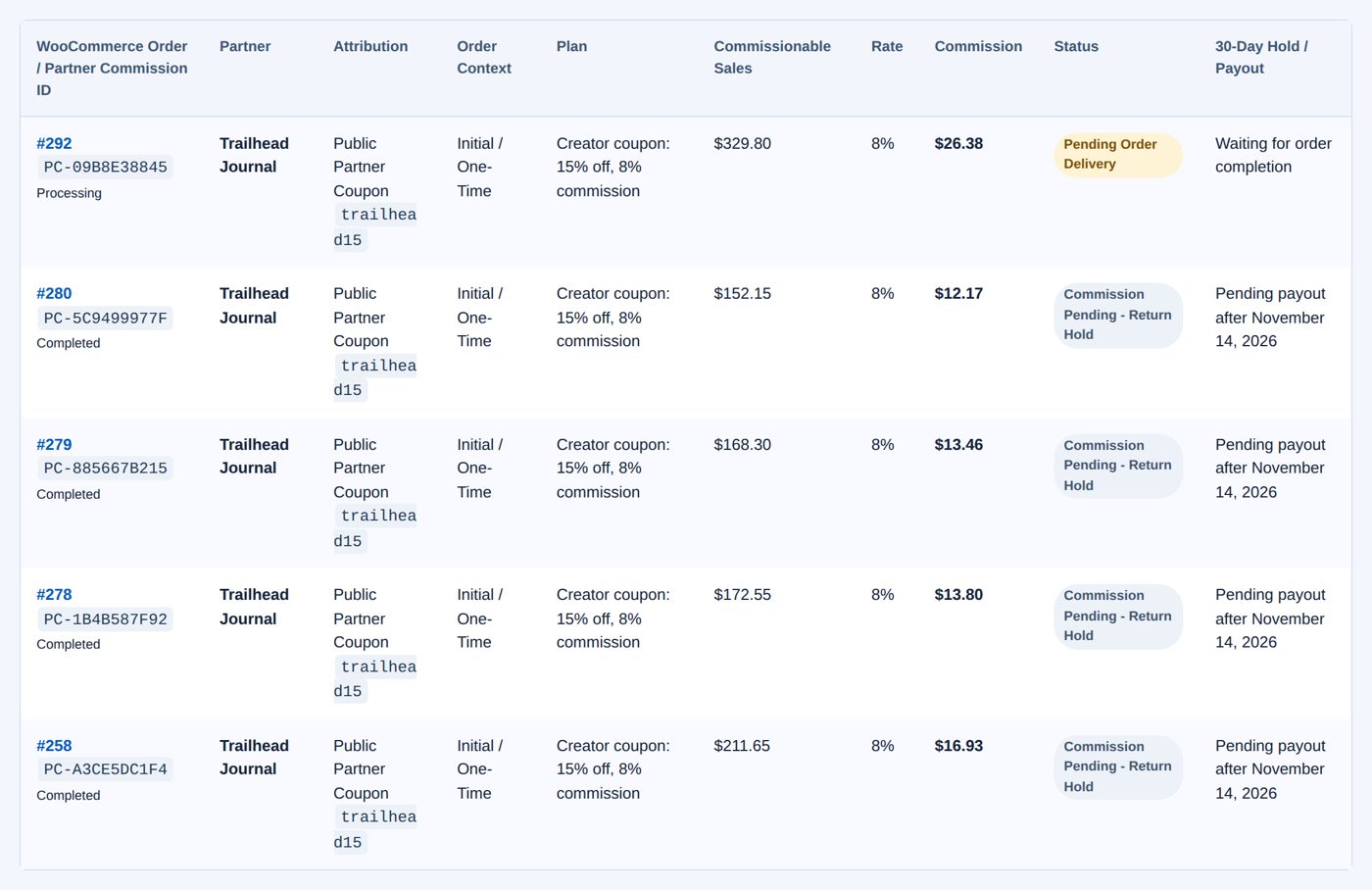
Two orders of the sample store with Trailhead Journal's coupon trailhead15 (15% off, plan Creator coupon: 15% off, 8% commission):
| Order | Merchandise | After 15% off | Commission at 8% |
|---|---|---|---|
| 292: Ridgeline 2-Person Tent $249, Trailhead 45L Backpack $139, two free gifts | $388.00 | $329.80 | $26.38 |
| 280: Summit Down Sleeping Bag $179, Wool Camp Socks $28, a free gift | $207.00 | $175.95 | $14.08 |
Each commission gets a reference such as PC-09B8E38845 that you can name to the partner instead of the order number.
From order to payable commission
| Status | Means |
|---|---|
| Pending Order Delivery | Credited to the partner; waits until the order is Completed ("Waiting for order completion"). |
| Commission Pending - Return Hold | Completed; waits out the Commission Adjustment Hold ("Pending payout after ..."). A refund now reduces or voids it. |
| Pending Payout | Final, ready for the next payout batch ("... -day hold complete"; an adjustment or a bonus, which is never held: "Ready for the next payout"). |
| Paid | Paid in a batch ("Paid ..." with the date). |
| Voided | Not payable ("Not payable"): the order was cancelled, failed or fully refunded during the hold, or you voided it. |
The hold counts from the moment WooCommerce marks the order Completed (30 days at the start; Settings). Once an hour AffiliPartnerCS moves commissions whose hold has ended to Pending Payout. Cancelled, failed and refunded orders create no commission at all.
Refunds
During the hold a refund of merchandise recalculates the commission from the merchandise left; a refund of shipping, tax or fees changes nothing. A fully refunded, cancelled or failed order voids it. A fixed commission stays whole as long as some merchandise is left.
After the hold the commission is final: you can still refund the customer, but the partner keeps the commission, and no clawback is created.
Worked example: the socks come back
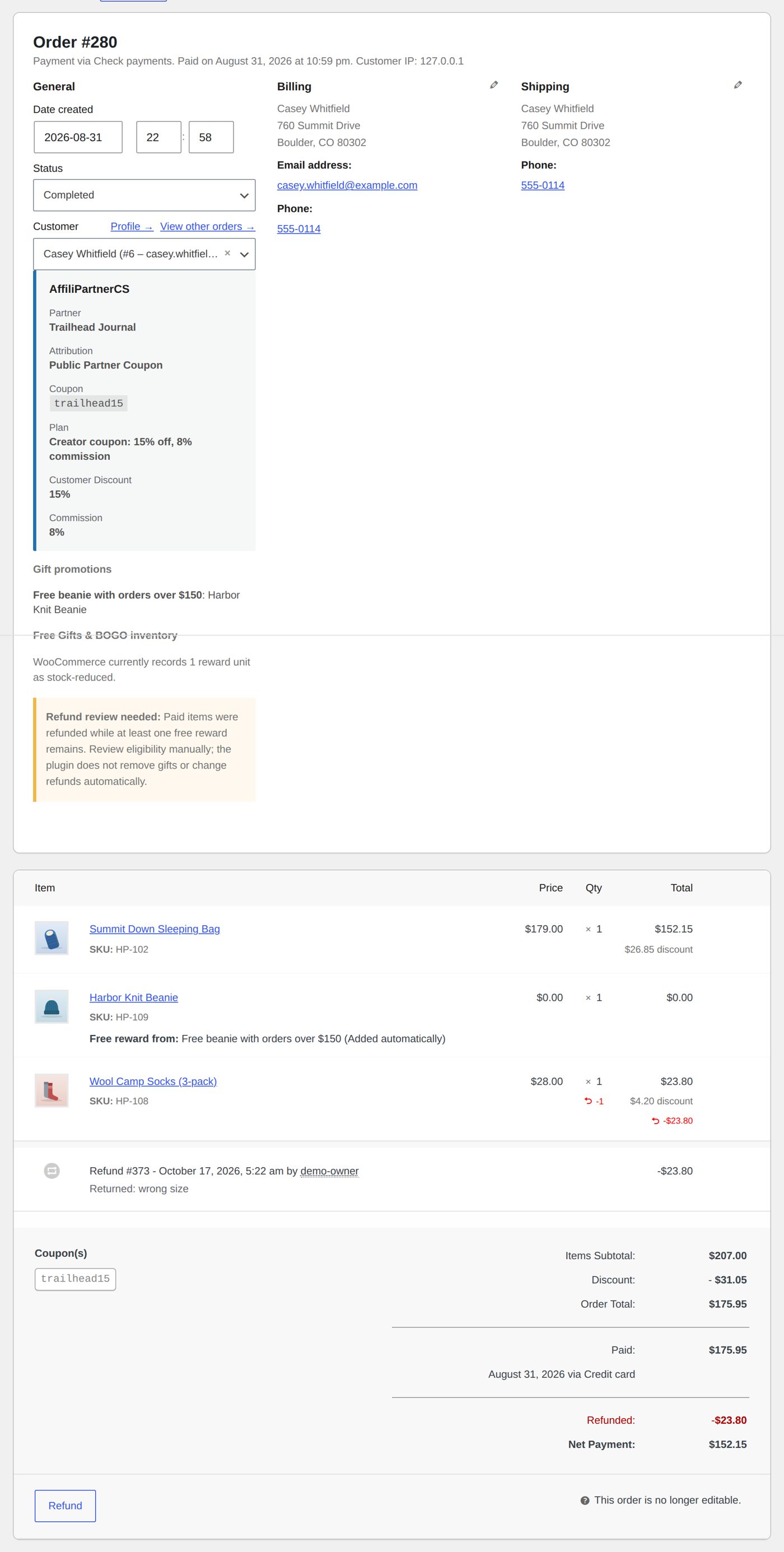
The customer of order 280 returns the socks. Harbor & Pine refunds the line in WooCommerce (Refund, the socks' line, $23.80) while the commission is still in its hold.
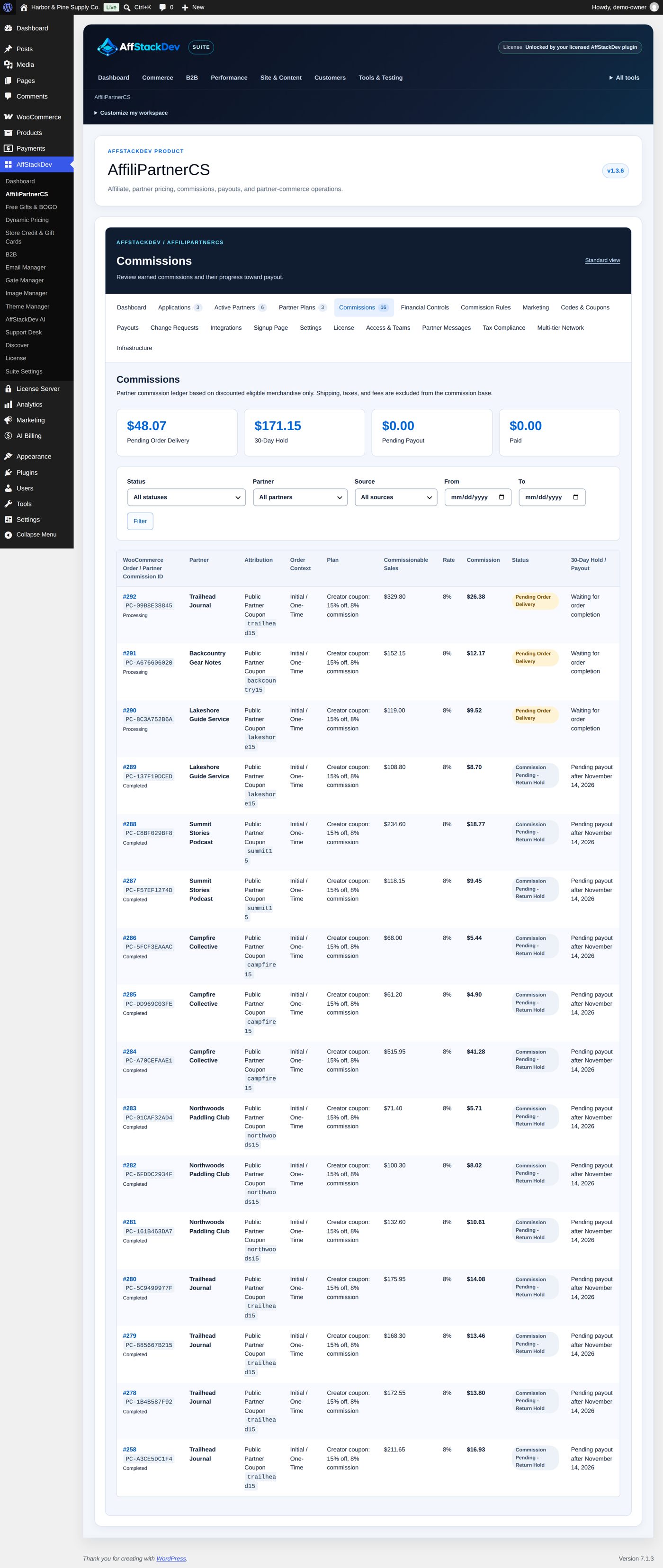
Under Commissions (filtered to Trailhead Journal) order 280's commission is now $12.17: 8% of the $152.15 left. Order 292 is still Pending Order Delivery because it is not completed yet:
The order screen shows the refund, and AffiliPartnerCS's details on the order:
The Commissions screen
Commissions is the ledger. At the top four totals: Pending Order Delivery, the hold (for example 30-Day Hold), Pending Payout and Paid, over all commissions. Filters: Status, Partner, Source (Verified Member, Public Partner Coupon, Affiliate Link, Multi-tier Referral), From and To (the commission's date), Filter; Clear removes them. 75 rows per page, newest first:
| Column | Shows |
|---|---|
| WooCommerce Order / Partner Commission ID | The order number (a link) and the PC- reference, and the order's status. |
| Partner | Who earned it. |
| Attribution | Verified member, public partner coupon (with the code), affiliate link, multi-tier referral or manual correction. |
| Order Context | Initial / One-Time, or a subscription renewal. |
| Plan | The plan the order was credited with. |
| Commissionable Sales | The base. |
| Rate | The plan's rate, or Advanced Rule Snapshot when a commission rule set it. |
| Commission | The amount. |
| Status and the last column | Where it stands, as in the table above. |
The ledger only shows; payouts and corrections are made on Payouts and Financial Controls. Amounts are in each order's currency; the totals at the top do not convert currencies.
On the order
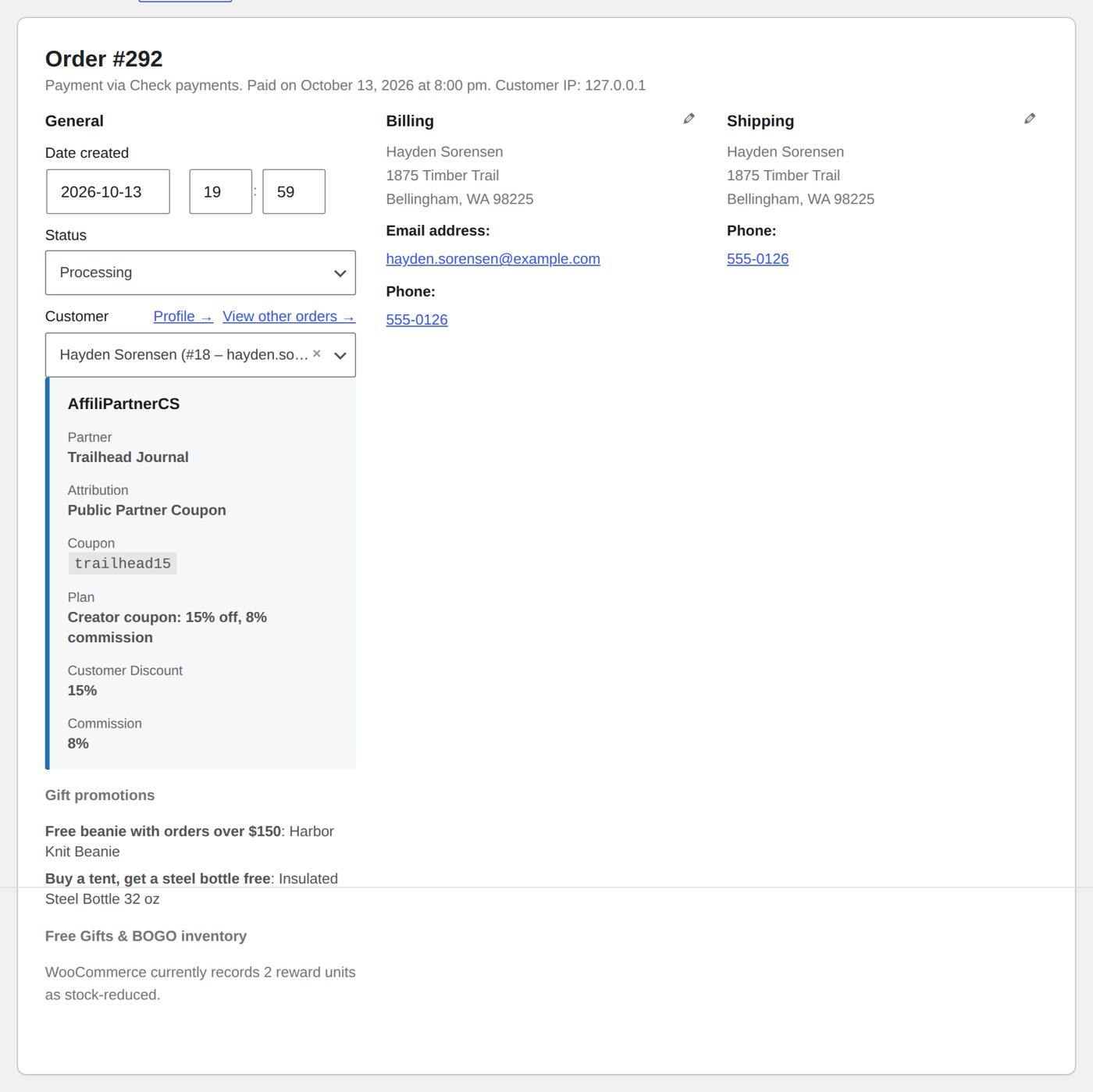
Every credited WooCommerce order shows an AffiliPartnerCS box in its details with what was recorded when it was credited: Partner, Attribution, the coupon or affiliate reference, campaign and sub-ID if any, the Plan, the customer's discount and the commission.
Commission rules
Commission Rules sets other rates for chosen products, categories or plans, or for everything. Rules are worked out per merchandise line: a product rule beats a category rule, a category rule beats a plan rule, a plan rule beats a global rule; between rules of the same kind the higher Priority wins. Lines no rule covers keep the plan's rate.
| Field | At the start | What it does |
|---|---|---|
| Rule Name | empty | Required. |
| Enabled | ticked | Enable this rule; unticked, the rule is saved switched off. |
| Priority | 10 | 0 to 100,000; higher wins between rules of the same kind. |
| Target | Global | Global, Partner Plan, Product or Product Category. |
| Target ID | 0 | "Use 0 for Global." The number of the plan, product or category; Show available target IDs lists them, and Find target IDs with Search Targets finds more. |
| Initial / One-Time Commission | Use Partner Plan Rate, 0 | Or Percentage or Fixed Amount. "For fixed rules, the amount is applied once per matching rule per order." |
| Renewal Behavior | Every Renewal | Initial / One-Time Sale Only, Every Renewal, First X Renewals or Declining Renewal Commission: for subscription renewals with WooCommerce Subscriptions. |
| Renewal Commission | Use Partner Plan Rate, 0 | The rate for renewals. |
| Renewal Limit | 0 | For First X Renewals: how many; for Declining, 0 means no limit. |
| Decline Per Renewal | 0 % | For Declining: "10% starting rate with 20% decline pays 10%, 8%, 6.4%, 5.12%..." |
| Return / Refund Hold Override | -1 days | -1 uses the global hold; 0 makes the commission payable right after completion; up to 3,650 days. An order with several rules uses the longest. |
Add Commission Rule saves: "Commission rule updated." Configured Rules lists every rule with Status, Priority, Target, Initial, Renewals, Hold and Delete. A rule cannot be edited: delete it and add it again. New rules apply to new orders; existing commissions keep the terms they were calculated with, also when they are recalculated after a refund.
Worked example: 12% on Camping & Hiking
Tents, sleeping bags and backpacks earn little margin for a partner at 8%. Harbor & Pine pays 12% on the whole Camping & Hiking category, for every plan.
- Commission Rules → Add Commission Rule. Rule Name Camping & Hiking: 12%; Target Product Category; Target ID 16 (from Show available target IDs); Initial / One-Time Commission Percentage 12; Renewal Behavior Initial / One-Time Sale Only; Return / Refund Hold Override -1.
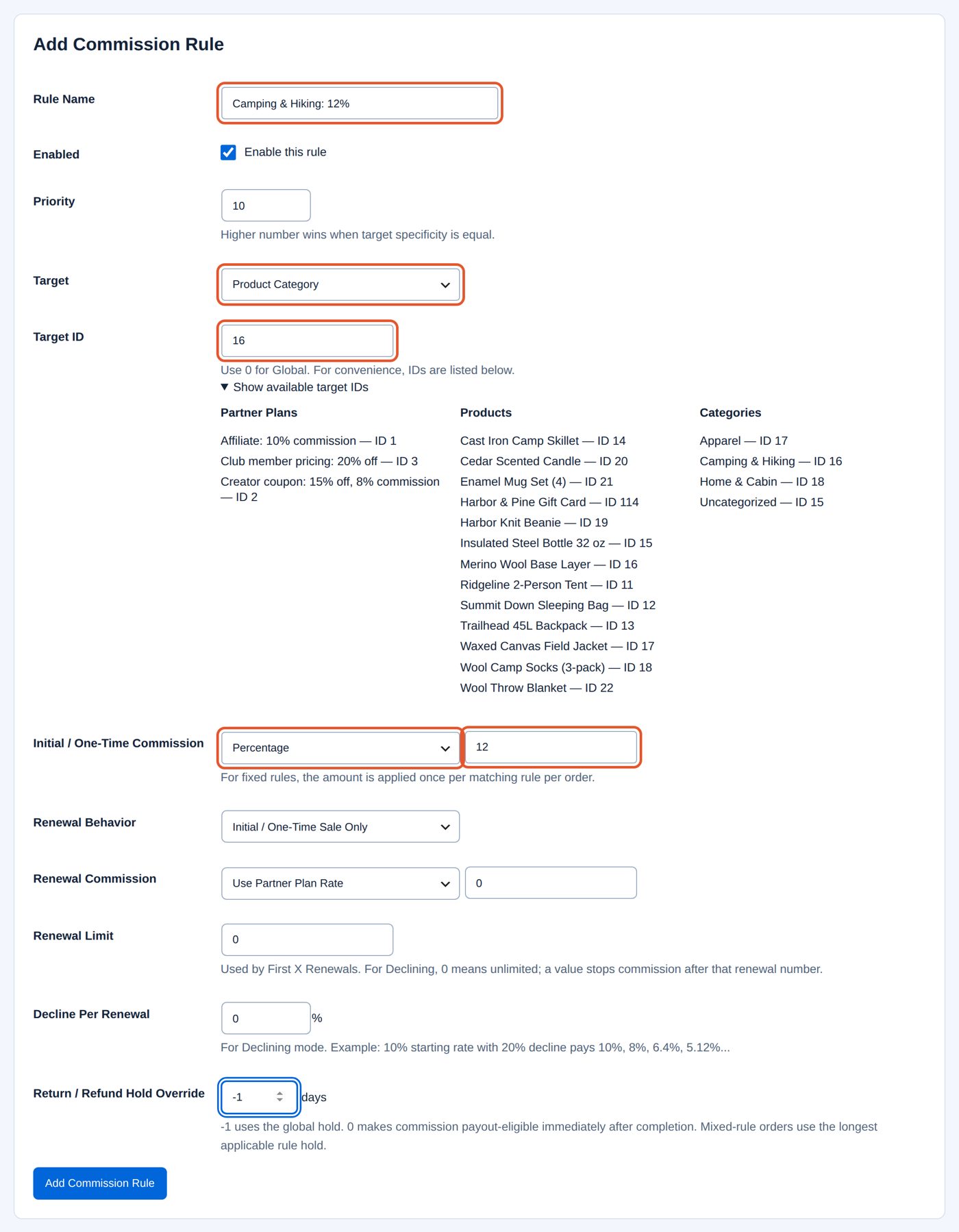
- Add Commission Rule: "Commission rule updated." The rule is listed as Enabled, Category #16, 12%, No renewals, hold Global:
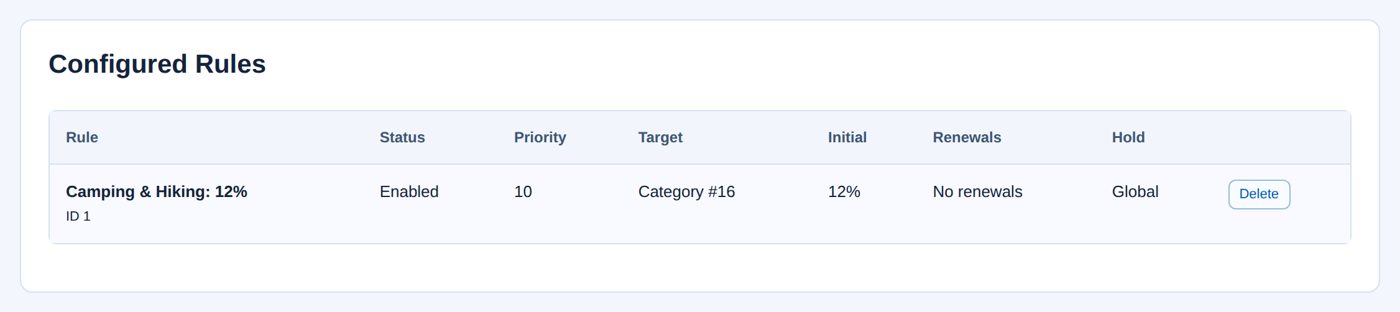
A later order with trailhead15 for the Ridgeline 2-Person Tent ($211.65 after the coupon) and the Merino Wool Base Layer from Apparel ($66.30) earns 12% on the tent ($25.40) and the plan's 8% on the base layer ($5.30): $30.70. Its Rate shows Advanced Rule Snapshot.
Corrections and adjustments
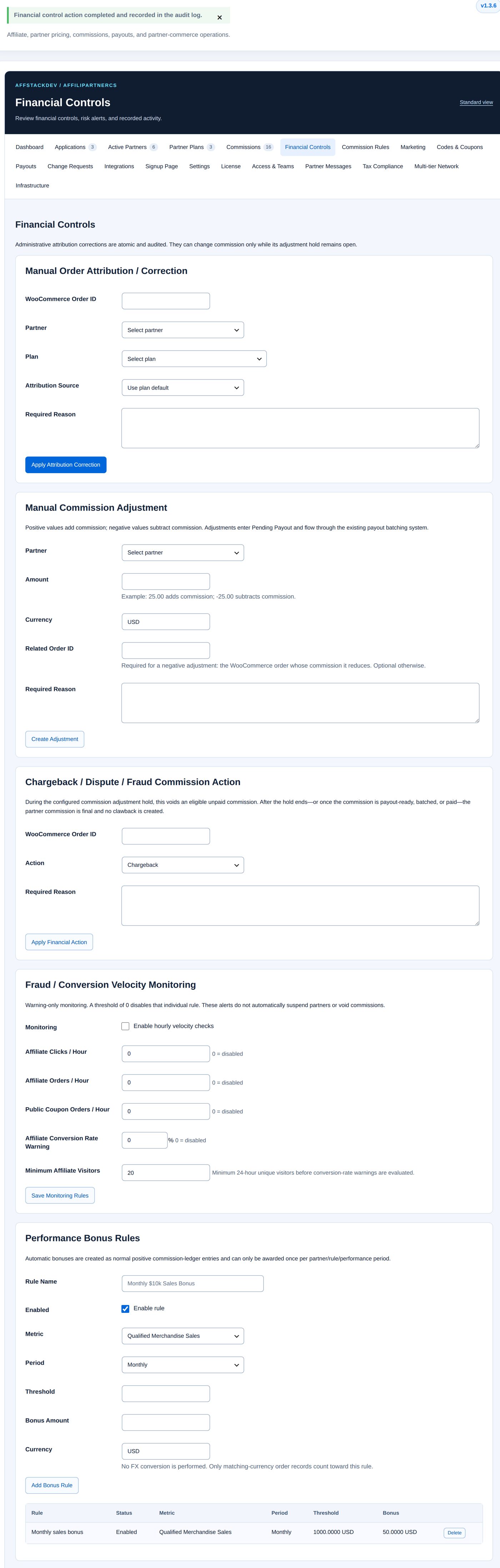
Financial Controls has three actions. Each takes effect at once (there is no preview), needs a reason, and is recorded in the audit log and, for an order, as an order note: "Financial control action completed and recorded in the audit log."
| Action | Fields | What it does |
|---|---|---|
| Manual Order Attribution / Correction | WooCommerce Order ID, Partner, Plan, Attribution Source (Use plan default, Verified Member, Public Coupon, Affiliate, Manual Correction), Required Reason | Credits an order to a partner, or to another partner, and calculates its commission. Only while the order's hold is still open; it never changes what the customer paid. |
| Manual Commission Adjustment | Partner, Amount, Currency, Related Order ID, Required Reason | A separate ledger entry: 25.00 adds, -25.00 subtracts. A negative amount needs the order whose commission it reduces, of the same partner and currency, with its hold still open. The entry is Pending Payout at once and goes into the next batch. |
| Chargeback / Dispute / Fraud Commission Action | WooCommerce Order ID, Action (Chargeback, Dispute, Fraud / Manual Void), Required Reason | Voids an unpaid commission during its hold. After the hold, or once it is in a batch or paid, the commission is final. |
Worked example: $25 extra for Trailhead Journal
Harbor & Pine promised Trailhead Journal $25 for featuring its tents in the autumn gear guide.
- Financial Controls → Manual Commission Adjustment: Partner Trailhead Journal, Amount 25.00, Currency USD, Required Reason "Thank-you for featuring our tents in the autumn gear guide (agreed by email on 12 October)." No order: the amount is positive.
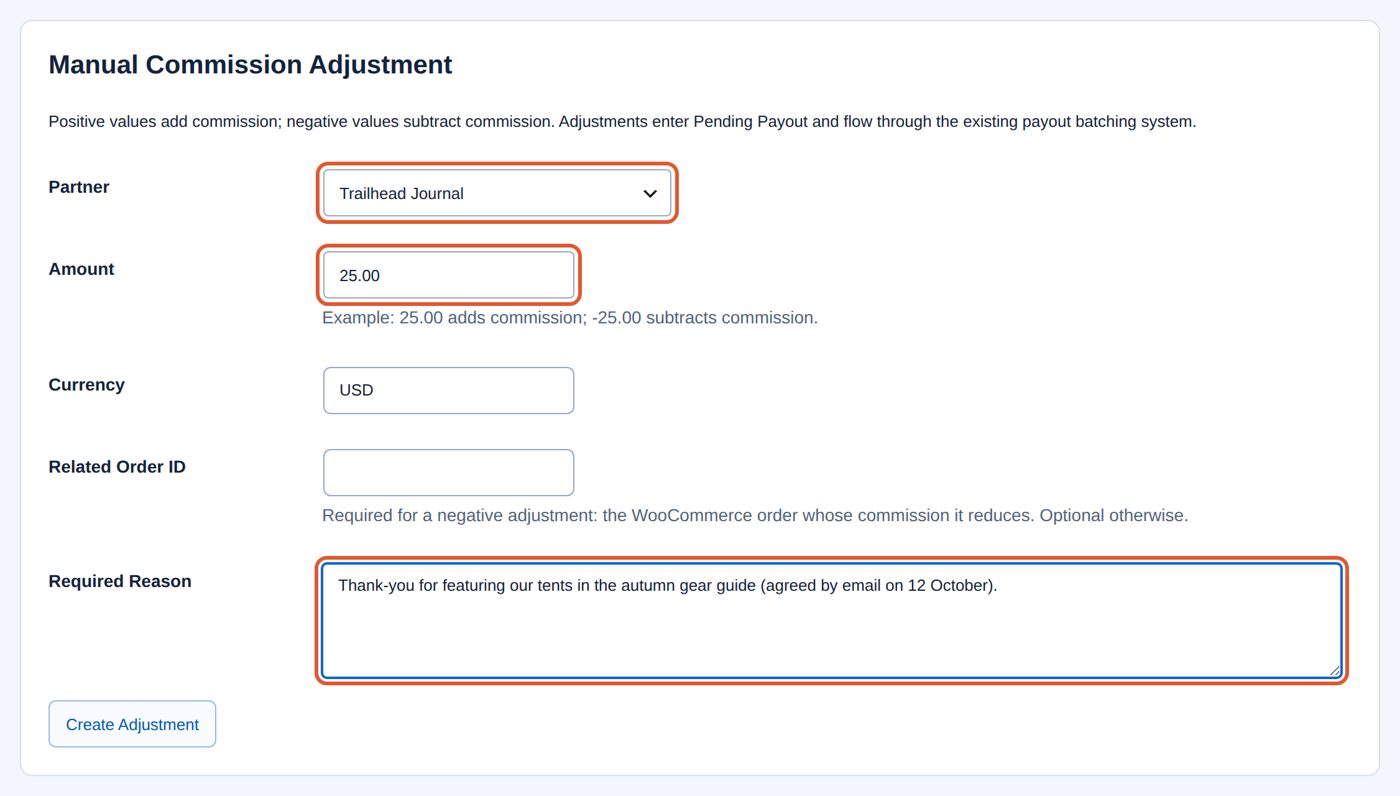
- Create Adjustment: "Financial control action completed and recorded in the audit log."

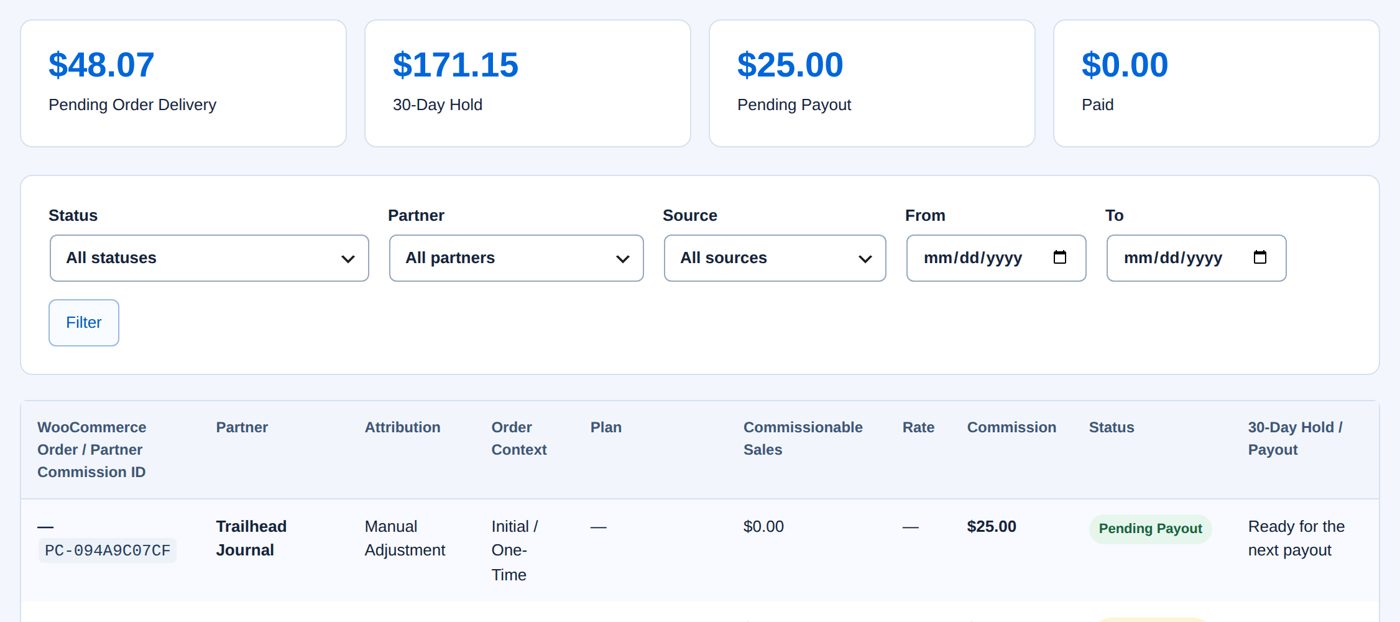
The Commissions ledger has a new row without an order (—): Manual Adjustment, $25.00, Pending Payout, "Ready for the next payout"; the Pending Payout total rises by $25.00. It is paid with Trailhead Journal's next batch.
Unusual activity
Fraud / Conversion Velocity Monitoring warns; it never suspends a partner, holds a payout or voids a commission.
| Field | At the start | What it does |
|---|---|---|
| Monitoring | not ticked | Enable hourly velocity checks of active partners. |
| Affiliate Clicks / Hour | 0 | A warning when a partner's link gets this many clicks in an hour; 0 switches the check off. |
| Affiliate Orders / Hour | 0 | The same for affiliate orders. |
| Public Coupon Orders / Hour | 0 | The same for coupon orders. |
| Affiliate Conversion Rate Warning | 0 % | Orders divided by visitors over 24 hours, from this percentage. |
| Minimum Affiliate Visitors | 20 | The conversion warning is checked only from this many visitors in 24 hours. |
Save Monitoring Rules saves. Open Fraud / Risk Alerts lists the open warnings (the latest 100), including blocked self-referrals; Resolve closes one after you have looked at it. Recent Audit Activity lists the latest 100 recorded actions with Date, Event, Partner, Severity, Performed By and Summary.
Bonuses and automatic tiers
Both measure a partner's results in one currency, by Metric: Qualified Merchandise Sales, Qualified Order Count or Earned Order Commission (from the partner's order commissions that are not voided; bonuses and adjustments do not count). They are worked out once a day; Run Bonus & Tier Evaluation Now starts it at once.
Performance Bonus Rules: Rule Name, Enabled (Enable rule), Metric, Period (Monthly, Quarterly, Yearly), Threshold, Bonus Amount, Currency (the store currency at the start; "No FX conversion is performed."), then Add Bonus Rule. A partner who reaches the threshold in a calendar month, quarter or year gets the bonus once for that period, as an ordinary commission entry that goes through the hold and the payouts. Delete stops a rule; bonuses already given stay.
Automatic Partner Performance Tiers: Tier Name, Enabled, Sort Order (10; "Higher tiers should have higher sort-order values."), Metric, Threshold, Evaluation Window (30 days), Currency, and for each kind a plan override (Verified Plan Override, Public Coupon Plan Override, Affiliate Plan Override; No override keeps the partner's own plan), then Add Performance Tier. A partner who reaches a tier within its window gets that tier's plans; one who falls below goes back to its own plans. Lock this partner to the current tier on the partner's Performance section stops the automatic changes for that partner.
Worked example: $50 for $1,000 of sales in a month
- Financial Controls → Performance Bonus Rules: Rule Name Monthly sales bonus, Metric Qualified Merchandise Sales, Period Monthly, Threshold 1000, Bonus Amount 50, Currency USD.
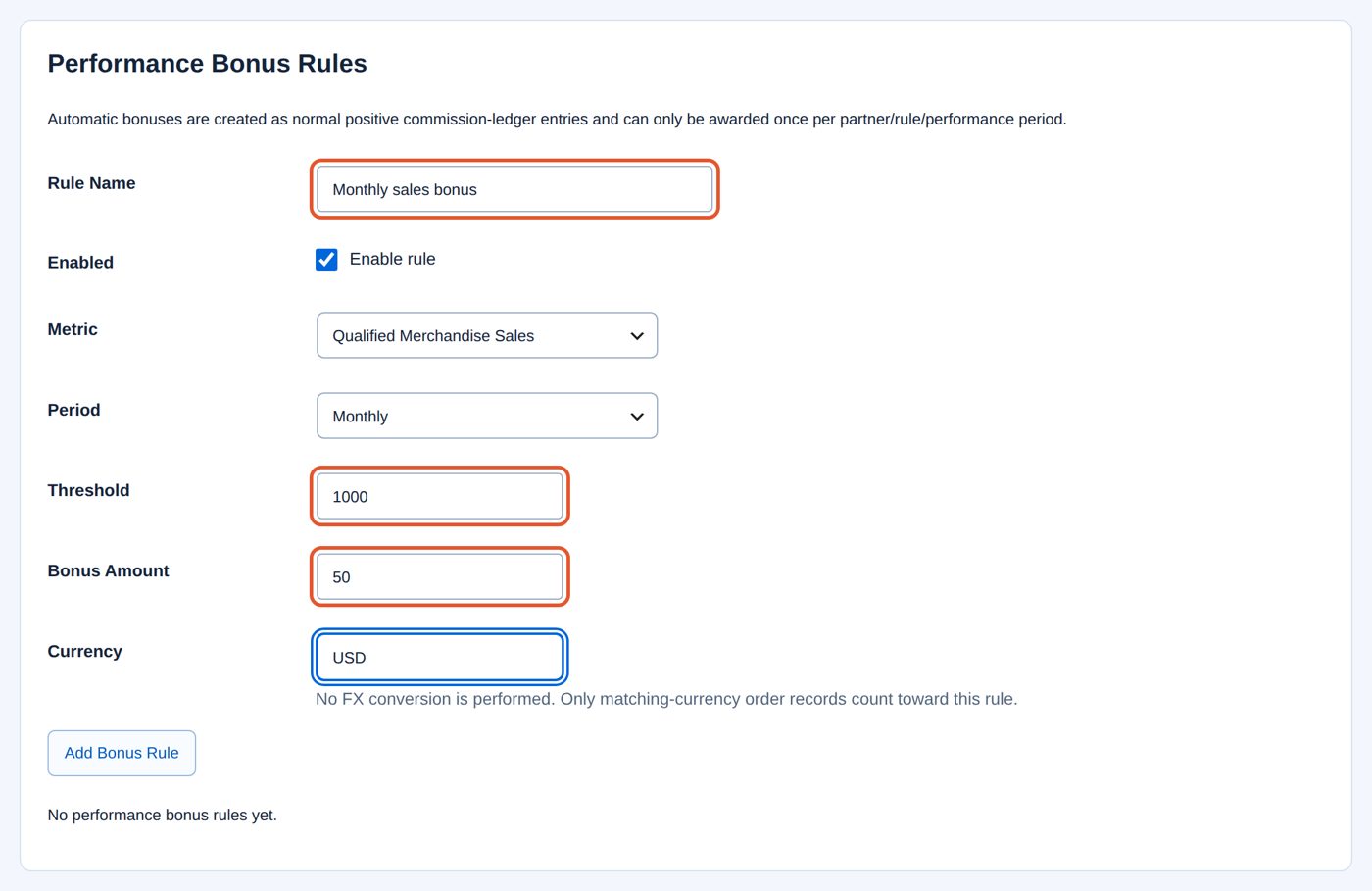
- Add Bonus Rule. The rule is listed. A partner whose credited merchandise reaches $1,000 in a calendar month gets one $50 entry for that month.
Multi-tier Network
Multi-tier Network pays a partner a share when a partner it brought in earns commission. Global switch (Enable multi-tier commissions, off at the start), Maximum depth (1 level to 5 levels, 2 at the start) and a default rate per level (0% each); Save Global Settings. Under Per-relationship Control enter the Referred partner ID and the Referring partner ID (the partners' numbers), tick Enabled, optionally Rate overrides such as 1:12.5,2:4, and choose Save Relationship.
A tier earns its rate of the referred partner's commission, not of the customer's order: with a commission of $40, level 1 at 12.5% earns $5.00 and level 2 at 4% earns $1.60, and the partner itself still earns $40. Each tier share is a commission of its own with the same hold, paid in its own partner's batch. Both the global switch and the relationship must be on.
Subscriptions
With WooCommerce Subscriptions, the first order's partner also gets the renewals, under the rules' Renewal Behavior; the ledger shows the renewal number, and Commission Rules says whether WooCommerce Subscriptions is detected. Other subscription plugins are not read for this. Without it, one-time orders work as described.
When it does not work
| You see | It means |
|---|---|
| An order has no commission | No partner was credited: the coupon was not a partner's, the link's window had passed, the buyer was the partner, the partner was not active, its plan was switched off, or the license was not active. Credit it with Manual Order Attribution / Correction while the hold is open. |
| A coupon is "not valid" for a business customer | Partner coupons are consumer offers (above). |
| "The commission adjustment hold for this completed order has already ended, so new attribution cannot be added." | Too late for a correction; the order is final. |
| "A negative commission adjustment must reference the WooCommerce order whose commission is being adjusted." | Enter the Related Order ID. |
| "The selected partner or currency does not match the referenced order commission." | The related order belongs to another partner or currency. |
| "This commission adjustment hold has ended. The partner commission is final and cannot be voided or clawed back." | A chargeback after the hold changes nothing for the partner. |
| "This financial action was already submitted moments ago." / "This attribution correction was already submitted moments ago." | The same action was sent twice; the first counts. |
| A commission stays Commission Pending - Return Hold after its date | It moves within the hour; on a site without working WordPress scheduled tasks it waits for the next visit. Infrastructure → System Status shows the queue. |
Questions
Does the partner earn on shipping or tax?
No: only merchandise after discounts, without tax, shipping and fees.
Can I pay a commission before the hold ends?
Not as a commission. Set a shorter hold (for everything under Settings, or per product or category with a rule's Return / Refund Hold Override), or add a Manual Commission Adjustment.
A customer used two partners' coupons. Who gets the sale?
The partner of the first usable partner coupon on the order.
Does a partner see the customer's name?
No. The partner's workspace shows commission references, amounts and states, never customer names, emails or order numbers.
Related pages
| Page | What it covers |
|---|---|
| Partners, plans and coupons | Partner records section by section, adding a partner by hand, plans, coupons, suspending and deleting. |
| Payouts | Payout methods, the schedule, batches, paying and recording, store credit, PayPal and Stripe, currencies, tax. |
| The partner's workspace and more | What partners see and do under My Account, change requests, messages, teams, member pricing, staff roles, exports and maintenance. |