Check it, and when something is off
See what a visitor would see before they do, find out why a gate did or did not appear, and move a setup to another site.
Preview
Every gate has a preview at desktop and phone width, also for wording you have not saved yet. A preview sends no email and gives nobody access.
Simulator
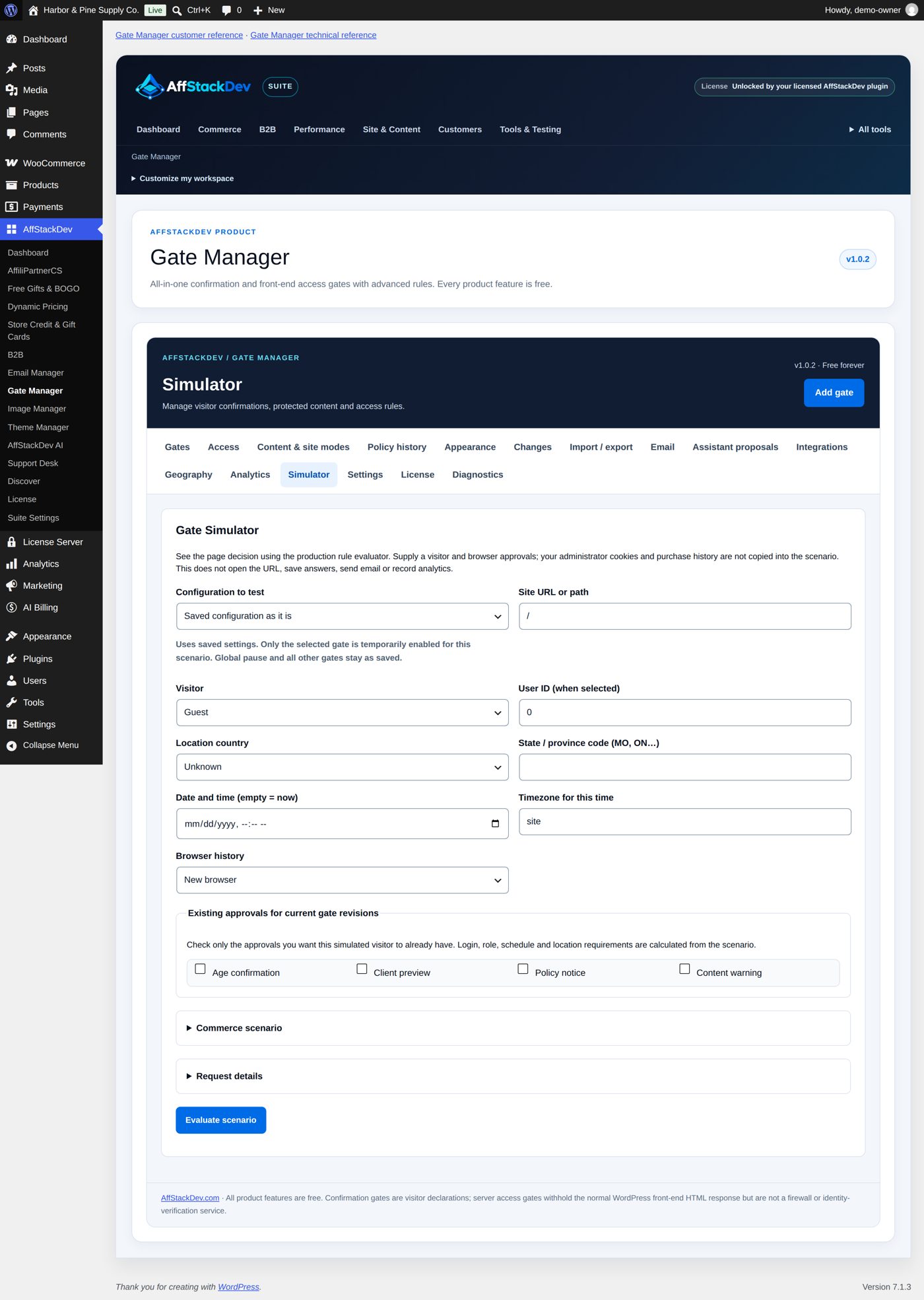
The Simulator tab answers "what happens to this visitor on this page?". Choose a page, who the visitor is (a guest, an account, a role), a place, a date and time, which gates they already passed and, for a store, what is in the cart. The answer names the first thing that would happen and explains each gate: applied, skipped, and why.
Diagnostics
Diagnostics explains one page for a guest and for you, and can fetch the page the way a visitor's browser would, to show what your site really sends. Use it when a gate works for you but not for visitors, or the other way round: the usual cause is a cache.
Counting (optional)
Analytics is off until you turn it on. It then counts events on your own site: how often a gate was shown, confirmed, declined, how many codes were refused, how many purchases were stopped. You choose how long the numbers are kept and can export or clear them. These are counts of events, not of people or of sales.
Looks
Appearance sets colors (light, dark, follow the device, or your own), font, logo, background and button style for all gates. A single gate can have its own look and can go back to the shared one at any time.
Undo and move
- Changes keeps a history of your configuration with before and after, and can restore an earlier state of a gate.
- Import / export saves selected gates, or all of them, to a file. Importing on another site adds them as new, disabled gates so you can check paths and roles there before you enable them. Codes, invitations, visitors' access and the license are never in the file.
Problems and their usual cause
| What you see | Look at |
|---|---|
| I never see my gate | You are an administrator and pass it. Test signed out, or in a private window. |
| Visitors see the page without the gate | A page cache is serving a stored copy. Clear it; exclude protected pages from the cache. |
| A confirmation does not come back | The visitor's answer is still remembered (60 minutes without a click, or 30 days with "Remember this browser"). Reset answers or delete this gate in the gate makes everyone answer again. |
| The gate appears on a page it should not | Check the gate's paths and exclusions, then try the page in the Simulator. |
| A code or link "does not work" | It is expired, used up or revoked: the Access tab says which. Make a new one. |
| Emails with codes do not arrive | Send yourself a test from the Email tab. If that fails too, the site's mail setup is the cause, not the gate. |
| Visitors cannot send an access form since you chose Cloudflare Turnstile | The Turnstile widget in your Cloudflare account does not list your site's address, or Cloudflare cannot be reached from the visitor or from your site. Check the widget's hostnames in Cloudflare, or choose Built-in question: no account or keys on the Settings tab. |
| The Coming Soon page looks different from the editor | With Inside the gate card, under the heading and explanation the page sits in the gate's card, in its colors. Choose The whole page, as your site shows it to show it as your site does. |
| A new gate does nothing | New and copied gates are saved disabled. Select Review draft, then Enable this gate. |
| Everything is switched off at once | Enable visitor gates on the Settings tab is off. |
Questions store owners ask
Does the age question check how old the visitor really is?
No. The visitor declares it: by answering Yes, or, if you choose Date of birth, by typing a date that their browser compares with your minimum age. Nobody checks the date or a document. Gate Manager keeps no birth date and sends none to your site: only the answer is kept, in the visitor's browser.
Will search engines still see my pages?
A confirmation (age, warning, policy) shows its question after the page has loaded, so the page itself is still sent. An access gate does not send the page until its rule passes, and with Send noindex while access is blocked (on at the start) it also asks search engines not to list the blocked page.
Are my pictures and PDF files protected too?
Not by the gate. A file has its own address and opens for anyone who knows it. Gate Manager protects what WordPress shows on a page: blocks, shortcodes, excerpts and feeds made from it.
Can different parts of my site ask different things?
Yes. Make one gate per part with its own Included paths, for example an age question on /shop/* and a sign-in on
/wholesale/*. A visitor must pass every access gate that covers a page; confirmations are then asked one after the
other, lowest Evaluation / display order first.
Does Coming Soon stop orders?
It hides the pages. It does not switch off WooCommerce or programs that order through your store's API; switch off payment methods as well if nothing may be sold.
What happens to a protected section if I deactivate Gate Manager?
The check goes with the plugin: content you put inside a Gate Manager Protected Content block is then shown like any other content. Keep Gate Manager active while such pages are published.
What does Gate Manager keep about visitors?
For a confirmation, only the answer in the visitor's own browser. Codes are kept as one-way fingerprints, never readable. A recorded policy acceptance is saved with a signed-in customer's account (who, which version, when). Access requests keep the name, email address and message the visitor typed. Analytics is off until you switch it on, and then counts events, not people. The spam check keeps no answers and no names: a used question and a count of checks per network address (as a one-way fingerprint) for a few minutes; with Turnstile, Cloudflare runs its check in the visitor's browser.
I changed a gate and visitors still see the old one.
Your page cache, your host's cache or a CDN is serving a stored copy. Empty it after changing a gate. Gate Manager says so after every save: "Saved. Clear page/hosting caches after changing public gate settings."
While the license is being sorted out
Nothing waits for it. Gates, settings, codes, invitations and approvals all work without a license. While a license is missing, expired or being checked, only the signed updates from affstackdev.com and the full mode of AffStackDev Suite wait for it.
Removing Gate Manager
Deactivating keeps everything. Deleting the plugin keeps its data too, unless you turned on Delete Gate Manager configuration when uninstalling on the Settings tab first.