The emails your site already sends
One list of every email WordPress, WooCommerce and your plugins send. Change the wording, pause one for a while, preview and test.
The list
Open Site Emails. Email Manager shows every email it recognizes: what it is, which system sends it, what triggers it, who gets it. Search by title, source or trigger; 20 per page.
After you install or remove a plugin that sends email, refresh the list: Diagnostics → Discovery → Refresh discovery now.
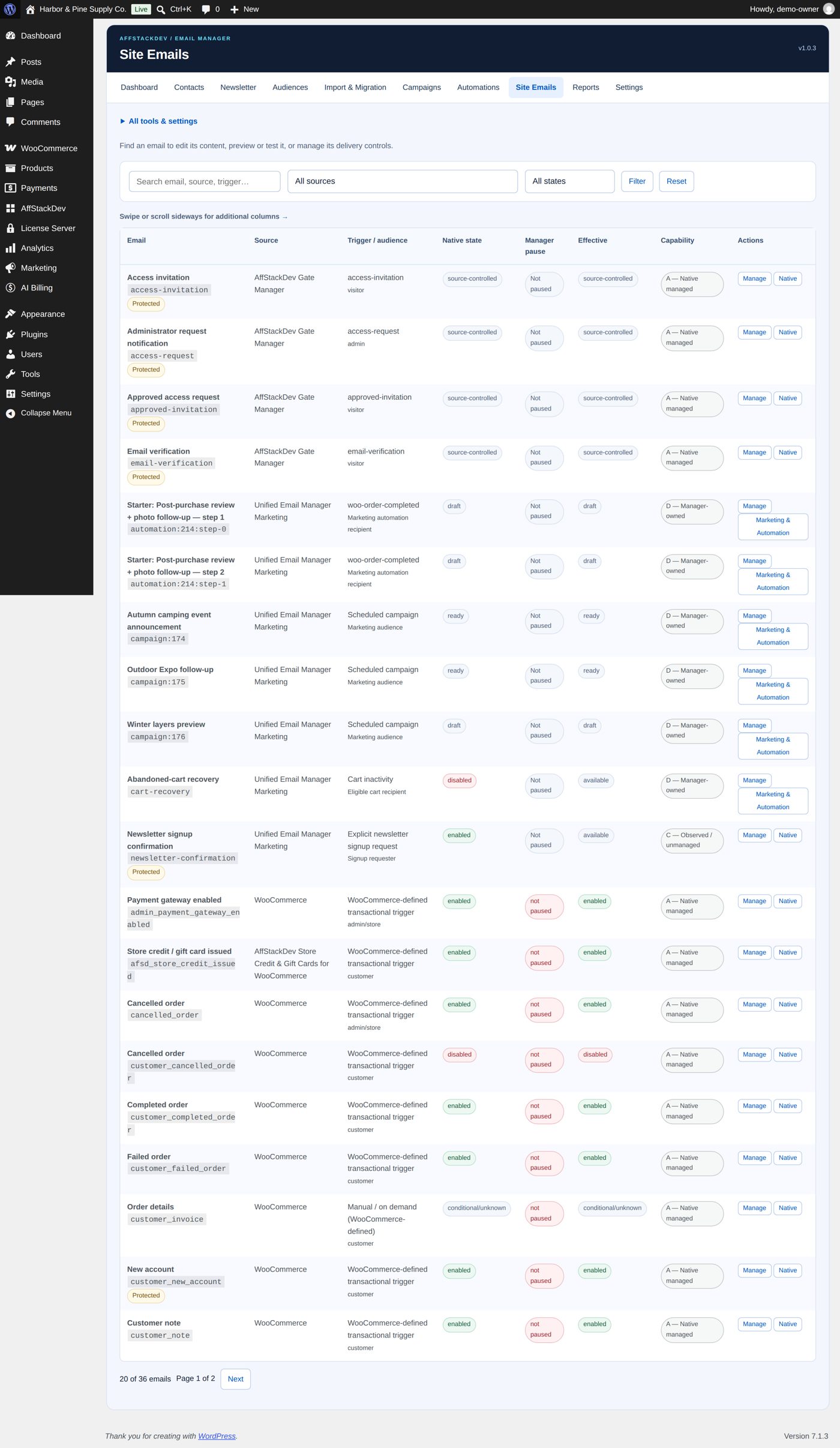
Three states
Each email shows three things:
| State | Means |
|---|---|
| Native state | Whether the email is switched on in the system that owns it (for example in WooCommerce's email settings). |
| Manager pause | Whether Email Manager is holding it back right now. |
| Effective state | The result of the two: this is what really happens. |
An email switched off at its source stays off, whatever you do here. An email that is on can be paused here.
Change the wording
Select Manage on an email. What you can change depends on its source:
- WooCommerce emails (new order, order completed, and so on, also those of WooCommerce extensions): switched on or off, subject, heading, additional content, recipients, format, CC, BCC, preheader. Your changes are saved in WooCommerce's own settings, so there is only one version of the truth.
- WordPress account emails (new account, password reset, password changed, email address changed): choose which parts to replace and leave the rest as WordPress writes it. Removing your replacement brings the original back.
- Other emails: if a plugin offers no way to edit its email, Email Manager shows it and links to that plugin's own settings.
{order_number} are filled in by WooCommerce when the email is sent. Keep them when you rewrite a subject or heading.The look of WooCommerce's emails
WooCommerce designs its own emails: logo, colours, font, alignment and footer, with a live preview, under WooCommerce → Settings → Emails. Design WooCommerce's emails on the Site Emails list opens it. Your wording from Email Manager shows inside that design.
WooCommerce also has a block email editor (a WooCommerce feature, off at the start) that builds its order and account emails from blocks. While it is on, such an email takes its heading and additional content from WooCommerce's editor, not from Email Manager; the email's page in Email Manager says so and links to it (Edit this email in WooCommerce's editor). The subject you save in Email Manager still applies.
{{native_message}}); Email Manager refuses to save it otherwise.Pause for a while
Useful while you import orders, migrate a store or test: Manage an email and open Status & pause controls, for that email or for its whole source.
Choose how long: until you resume it, 1 hour, 4 hours, 24 hours, 3 days, 7 days, or a date and time of your own.
Preview and test
On Preview & test, Preview shows the email with example data; no order or account is touched. Send test sends it to one address you enter, marked as a test, never to the real customer.
A test still goes through your site's mail connection. If the test does not arrive, the cause is there.