B2B
Business customers in your WooCommerce store: they apply, you approve them, and they get their own prices, quotes and company buying tools.
What it does
AffStackDev B2B lets businesses apply for a business account in your store. You review each application (or let valid ones through automatically). An approved business then gets:
- its own prices: a general business discount, prices for single products, and price books with quantity prices;
- quotes: it asks for a price, you send an offer, it accepts and pays exactly that offer;
- company buying: colleagues in a company team, a quick order form, saved lists, spending limits and purchase approvals;
- pay on account: order now and pay later by invoice, with payment terms (such as Net 30) and a credit limit, if you allow it;
- messages with you outside quotes, if you switch them on;
- its own stock, if you keep a separate business quantity on a product;
- tax exemptions, if you offer them, after you have reviewed the evidence.
Your ordinary customers keep shopping as before. B2B never changes the regular or sale price saved on a product: business prices are worked out for approved business customers as they shop, on product pages, in the cart and at checkout.
What you need
- B2B itself needs WordPress 6.6, WooCommerce 9.4 and 64-bit PHP 8.1 or newer. To work together with the other AffStackDev plugins (through Commerce Core, which comes inside), it needs WordPress 6.7 and WooCommerce 10.0. Use the higher numbers.
- A database with InnoDB tables, which is the normal case.
- A B2B license, activated in B2B's License tab by a site administrator (Activate your license).
- B2B is installed site by site; network activation on a multisite is not available.
Where it is
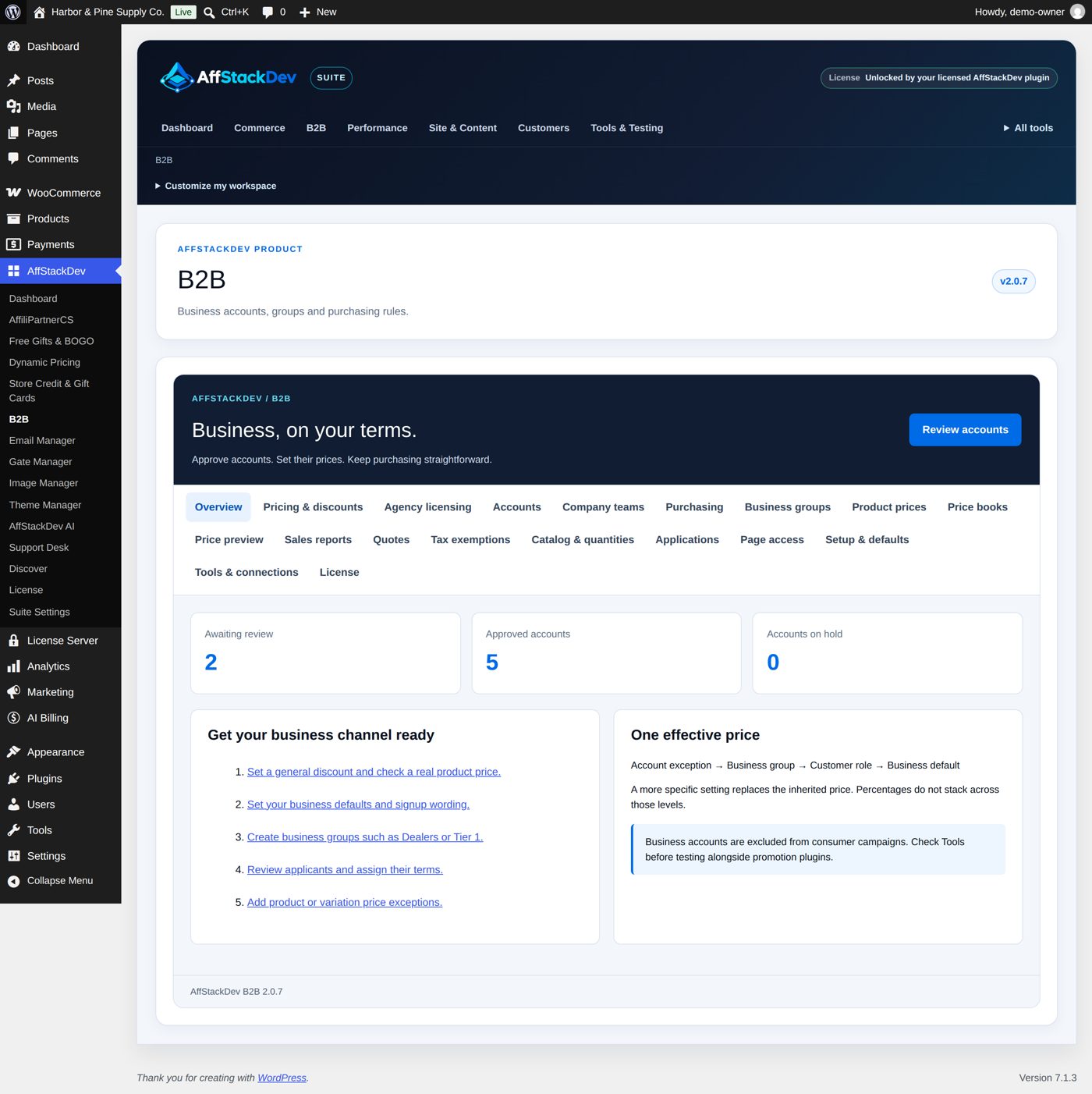
WooCommerce → B2B, or B2B's tab in the AffStackDev menu if you use the Suite. Staff need permission to manage WooCommerce (shop managers and administrators have it).
| Section | For |
|---|---|
| Overview | Accounts waiting, approved and on hold, and shortcuts. |
| Pricing & discounts | Who gets which business prices. |
| Agency licensing | Business prices for licensed software sold through AffStackDev License Server. Skip it if you do not sell software licenses. |
| Accounts | Business accounts: review, approve, terms. |
| Company teams | The people of each business account. |
| Purchasing | Payment and delivery methods, order limits, purchase approvals. |
| Accounts receivable | Pay on account: who may order on account, payment terms, credit limits, reminders, what each company owes, Record payment. |
| Business groups | Shared terms for many accounts, such as Dealers or Tier 1. |
| Product prices | A business price for one product or variation. |
| Price books | Dated sets of business prices with quantity bands. |
| Price preview | What a business customer pays for a product, before anyone buys it. |
| Sales reports | Business sales and quotes over a period. |
| Quotes | Quote requests, your offers, accepted quotes. |
| Tax exemptions | Applications for tax exemption and your decisions. |
| Catalog & quantities | Who may see, see the price of and buy which products; minimum and step quantities. |
| Applications | The signup form, account types, approval rules, emails. |
| Page access | Pages and posts only business customers may open. |
| Setup & defaults | How your store treats business customers in general. |
| Tools & connections | Workspace layout, connections to other plugins, exports, removal. |
Saving works in two steps
Every change goes through a review:
- Change the form and choose Review changes. The next screen lists exactly what will be saved.
- Choose Publish these changes to save it, or Back to editor to correct it.
If a colleague saved the same record while you had it open, B2B asks you to reload instead of overwriting their work.
Words used in B2B
| Word | Means |
|---|---|
| Business account | A customer's business status (waiting, approved, on hold, ...), tied to their login. |
| Account type | The kind of business account someone applies for. B2B starts with one, Business; you can add up to 20. |
| Business group | Shared terms for many accounts: discount, which price it starts from, payment methods, coupons, quote rules. Since 2.0.7 the screens say business group; two notes about profile changes and the Agency licensing section ("license programs") still say program. |
| Price book | A set of business prices with a start and end date and quantity bands. |
| Company team | The people of one business account: owner, managers, buyers, finance. |
The pages of this part
- Getting started
- Business accounts: applying and approving
- Business prices
- Who sees and buys what
- Quotes
- Company buying
- Tax exemptions, reports and records
- Your own AI
These pages describe B2B 2.1.0. The pictures come from Harbor & Pine, a sample store with made-up customers: three business groups (Outfitters and guide services 20% off, Clubs and schools 12%, Corporate gifts 8%), approved business accounts such as Granite Peak Outfitters (Dana Whitlock) and Pinecrest Summer Camp (Ben Okoye), and applications waiting for review.
Worked examples
| Example | Page |
|---|---|
| A $150 minimum for business orders; the signup page | Getting started |
| A business group "Lodges and inns" with 15% off | Getting started |
| Approve an application into a group; not approved, with a reason | Business accounts |
| A new application question: the resale certificate number | Business accounts |
| An exact $95 price for one product and one group | Business prices |
| A price book: $28 a set, $25 from 12 sets | Business prices |
| Cases of 12; a trade-only product; a page for business customers; a $250 order minimum | Who sees and buys what |
| Preparing an offer; a buyer accepting one | Quotes |
| Inviting a buyer; a quick order from a SKU list; a purchase above the approval threshold | Company buying |
| A tax exemption for a camp in Minnesota; a sales report | Tax exemptions, reports and records |