Business prices
A general discount, groups, an exact price for one product, customer role prices and price books with quantity bands, how B2B picks the one price that applies, and how to check a price before a customer sees it. With two worked examples.
What it is for
Approved business customers pay business prices: a percentage off for everyone or for a group, an agreed price for a single product, or a price list with quantity bands. B2B never changes the regular or sale price saved on a product; it works the business price out for the approved customer, in the shop, on the product page, in the cart and at checkout. Have ready: your business groups and an approved test account (Getting started).
Which price wins
B2B looks for a business price in this order and takes the first level that has one:
- the account's own terms,
- its business group,
- a customer role price rule,
- the business defaults.
Within a level, a product price comes first, then a matching price book, then that level's general discount. A variation's own price beats its parent product's. Levels never add up: "Pricing levels do not stack." After that, one separate cart discount of a price book can apply.
Two choices look alike but are not:
- Use inherited discount: this level has nothing of its own; the next level decides.
- No percentage discount (0%): this level decides "no discount" and stops the levels below it. "An explicit 0% replaces an inherited general discount."
The customer sees where the price came from. Under the price in the shop and on the product page: "Your account price", "Your business group price", "Your customer role price" or "Business default price". On each cart line, after "Business pricing:": "Account price", "Business group price", "Business default price", the name of the role rule, or the price book's name with its version and the counted quantity ("Outfitters season prices · v1 · 12 qualifying units").
Ways to set a price
| Method | With a base price of 100.00 and the value 15 |
|---|---|
| Exact unit price | value 80 gives 80.00 |
| Percentage off the price basis | 85.00 |
| Amount off each unit | 85.00 (never below 0) |
| Percentage added to the price basis | 115.00 |
| Amount added to each unit | 115.00 |
The base is the regular price, or the sale price while a product is on sale, as you choose for each level (Calculate from; in price books Price adjustment basis).
A general discount for everyone or for a group
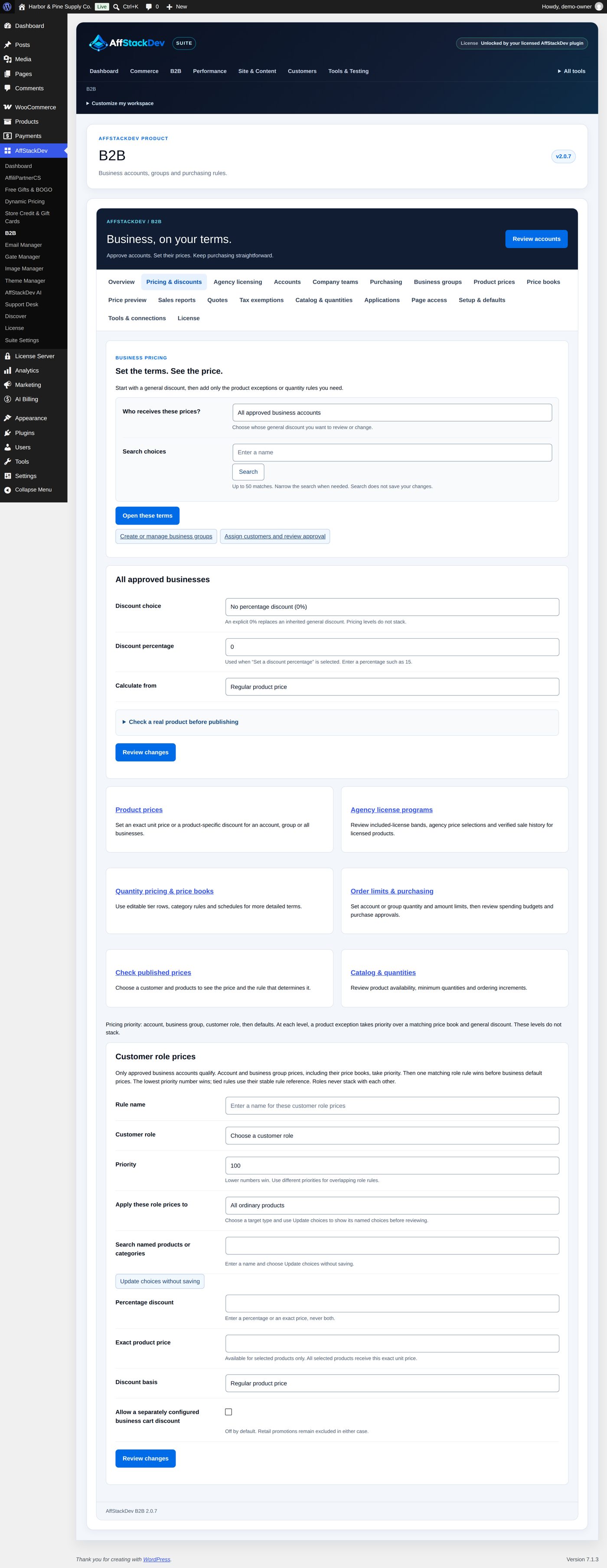
- Open Pricing & discounts. Under Who receives these prices? choose All approved business accounts, Business group: ... or Account: ... (with Search choices for long lists) and choose Open these terms.
- Set Discount choice, Discount percentage and Calculate from.
- Open Check a real product before publishing, choose Preview as a business customer (an approved account that receives these terms) and a product: the review shows the Unit price after publishing.
- Review changes, Publish these changes.
The same terms are on Setup & defaults (for all approved businesses), on the group and on the account; this screen gathers them in one place.
A price for one product
Product prices → Add new:
| Field | What it does | Example |
|---|---|---|
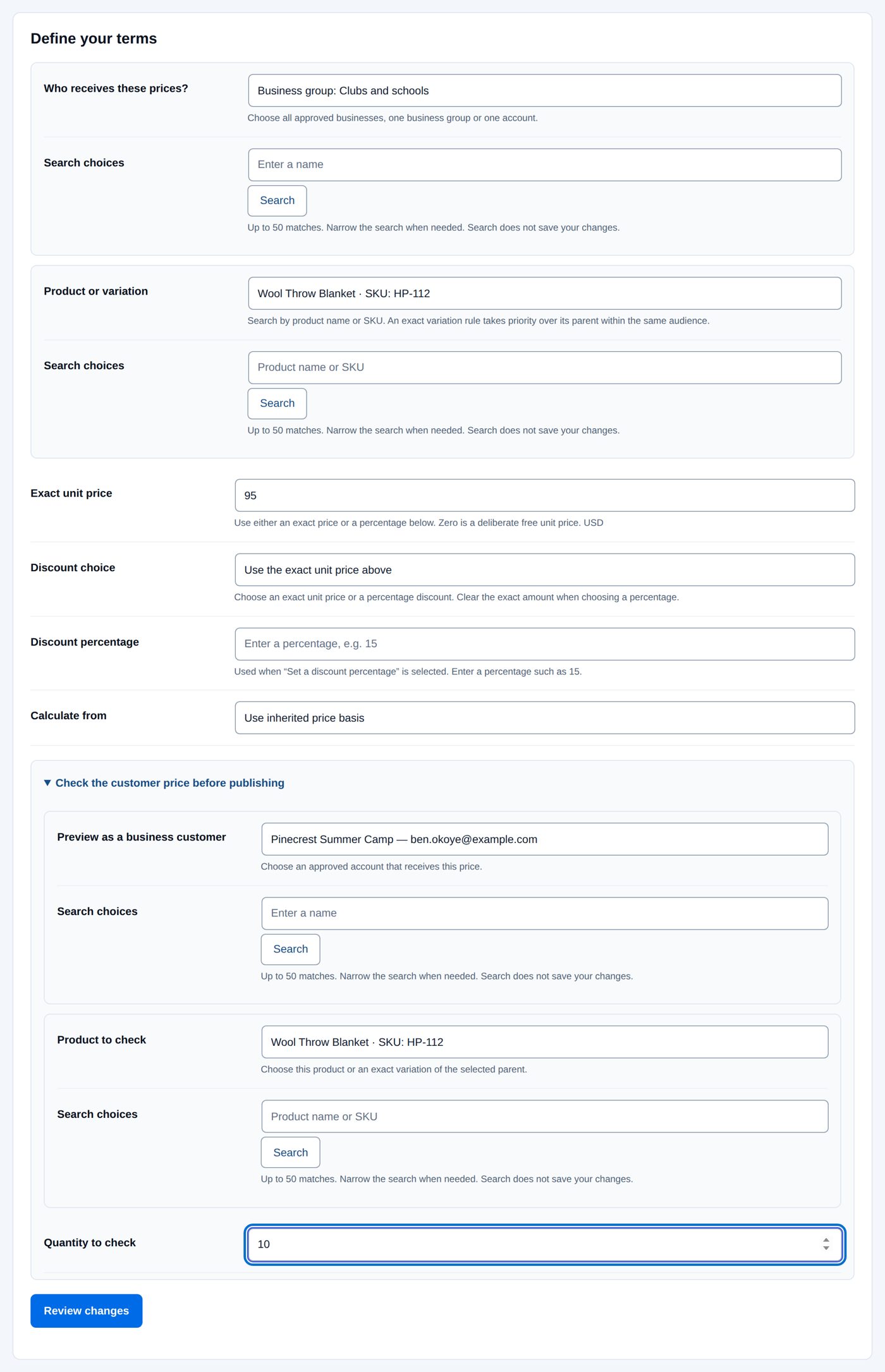
| Who receives these prices? | "Choose all approved businesses, one business group or one account." | Business group: Clubs and schools |
| Product or variation | "Search by product name or SKU. An exact variation rule takes priority over its parent within the same audience." | Wool Throw Blanket |
| Exact unit price | "Use either an exact price or a percentage below. Zero is a deliberate free unit price." In the store currency. | 95 |
| Discount choice | Use the exact unit price above, Set a discount percentage or No percentage discount (0%) | Use the exact unit price above |
| Discount percentage, Calculate from | for a percentage instead of an exact price | empty, Use inherited price basis |
| Check the customer price before publishing (fold-out): Preview as a business customer, Product to check, Quantity to check | the review then shows what that customer pays | Pinecrest Summer Camp, the blanket, 10 |
An existing product price has Review removal to delete it after a review.
Worked example: Clubs and schools pay exactly $95 for the Wool Throw Blanket
The blanket costs $118.00. Clubs and schools get 12% off everything, which would make it $103.84; Harbor & Pine has agreed $95.00 for camps and schools.
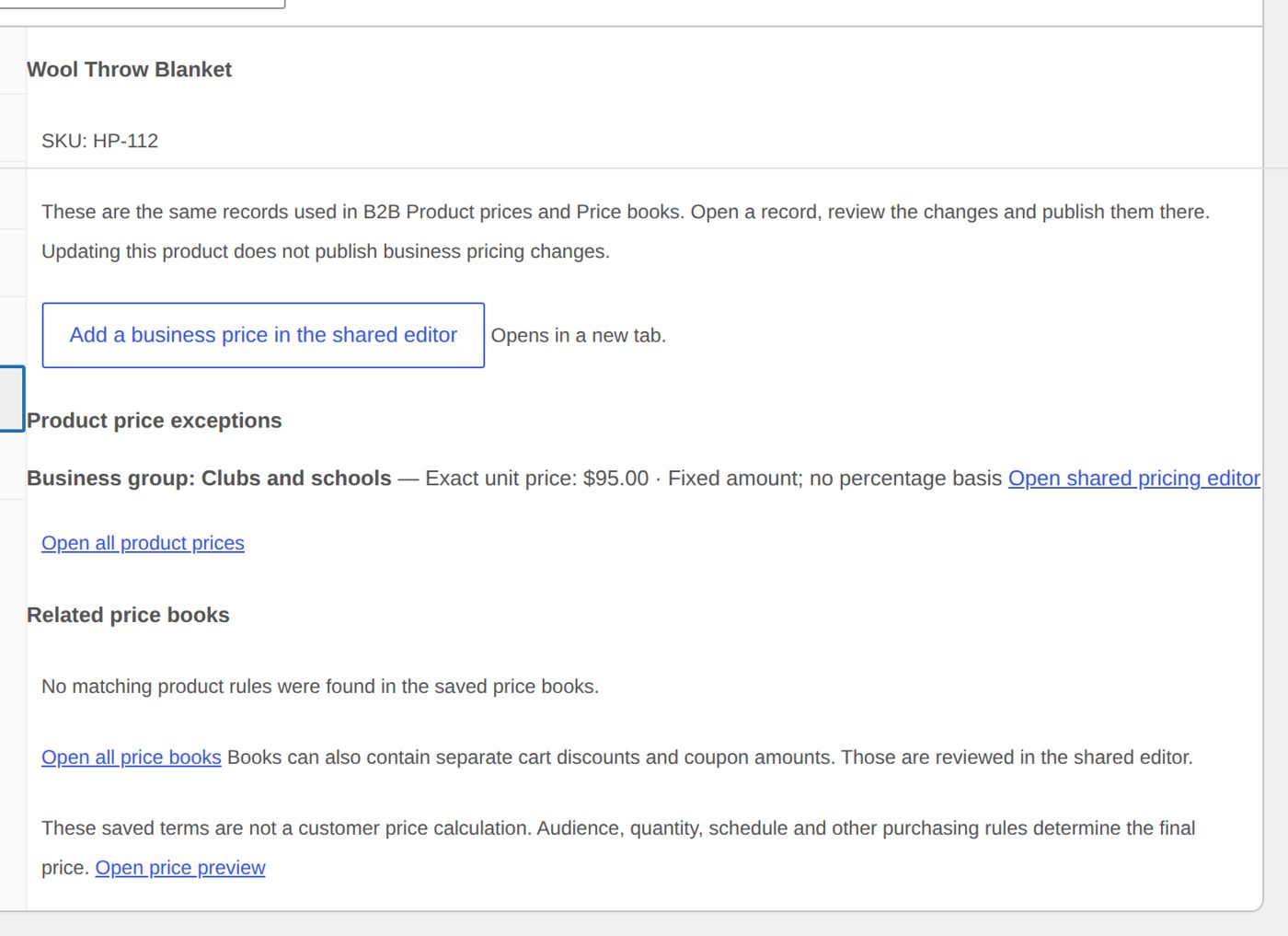
- Product prices → Add new. Who receives these prices? Business group: Clubs and schools; Product or variation Wool Throw Blanket; Exact unit price 95; Discount choice Use the exact unit price above.
- Open Check the customer price before publishing: Preview as a business customer Pinecrest Summer Camp (a camp in the group), Product to check the blanket, Quantity to check 10.
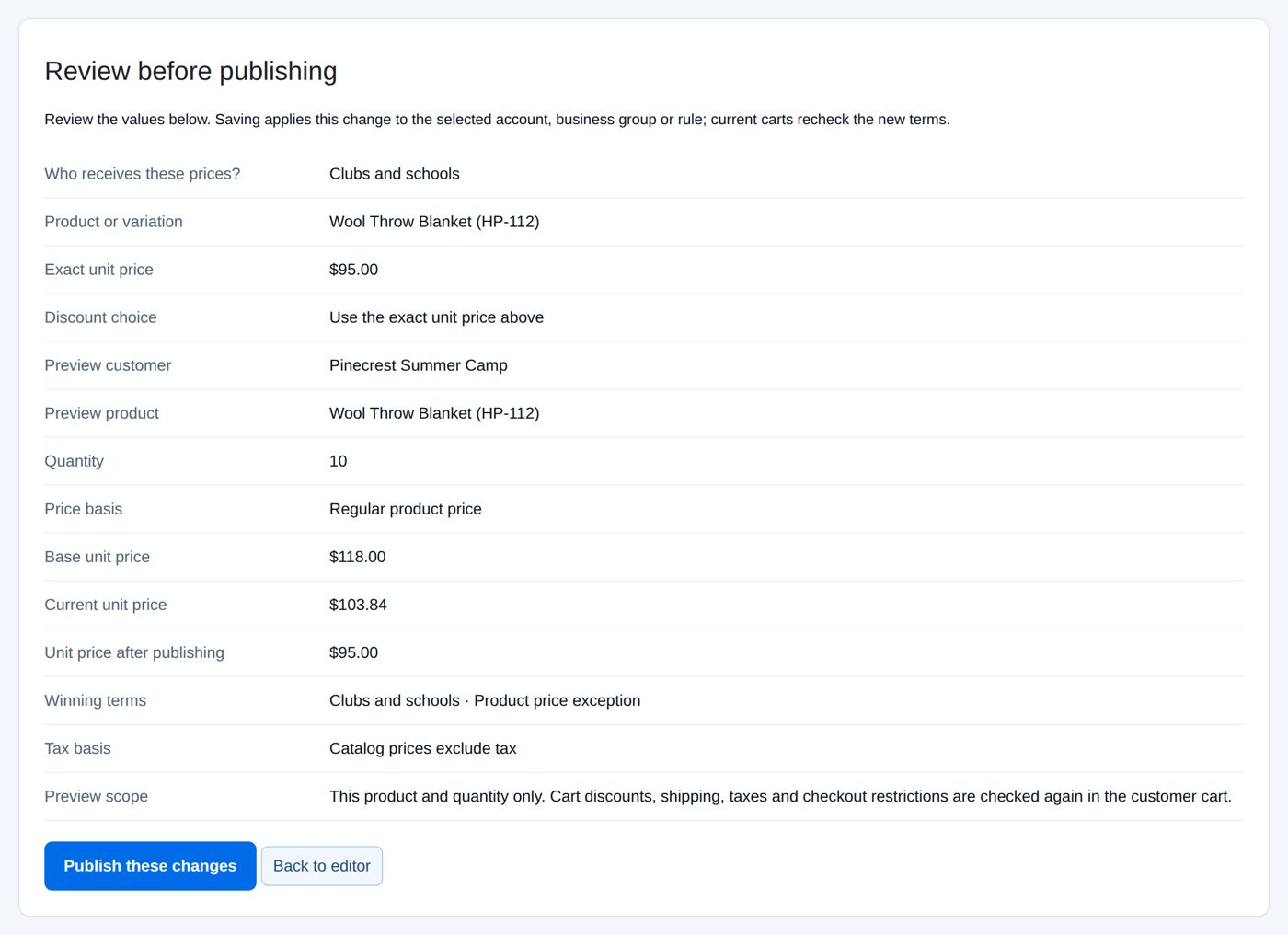
- Review changes: besides the audience, the product, "Exact unit price" $95.00 and Use the exact unit price above, the review works the check out for Pinecrest: Base unit price $118.00, Current unit price $103.84 (the group's 12%), Unit price after publishing $95.00, Winning terms "Clubs and schools · Product price exception". "Cart discounts, shipping, taxes and checkout restrictions are checked again in the customer cart."
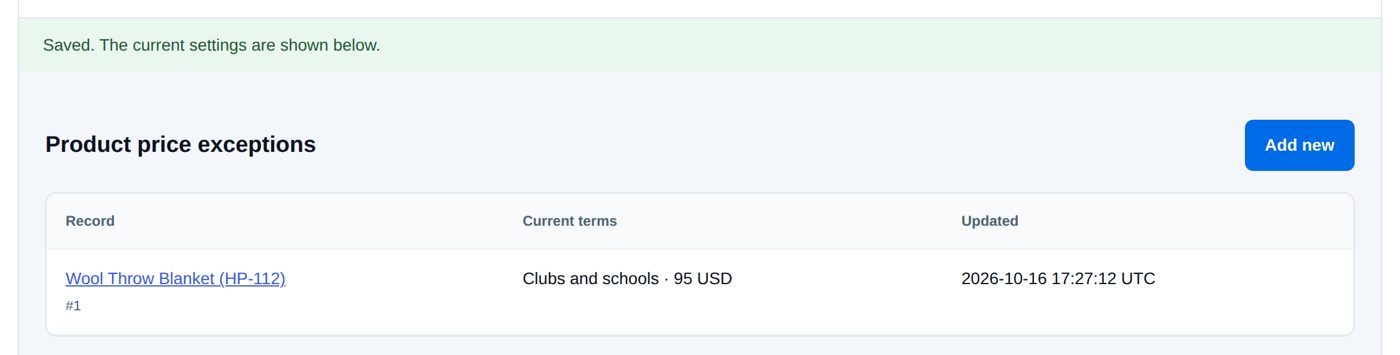
- Publish these changes: the price is in Product price exceptions.
The product editor (Products → Wool Throw Blanket) now lists the price in its Business pricing tab, with links into B2B (Add a business price in the shared editor, Open shared pricing editor; they open in a new tab). Variations have Business pricing for this variation. Updating the product does not publish business prices; that happens in B2B.
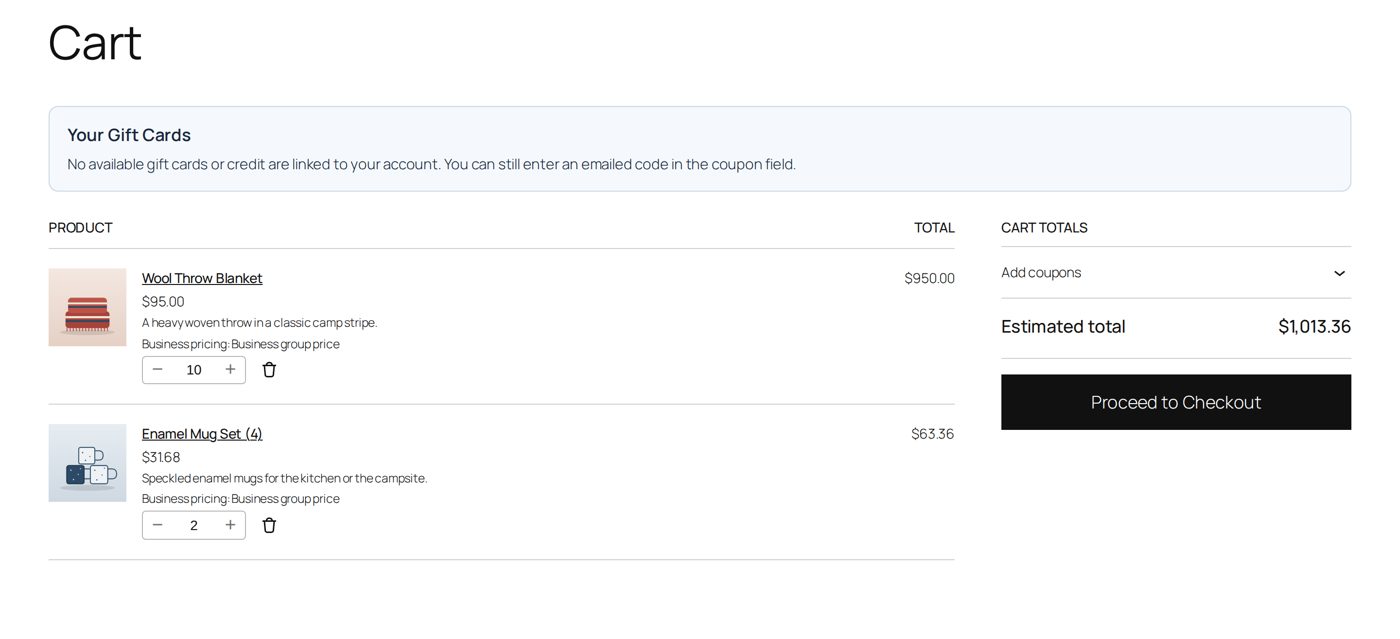
Ben Okoye of Pinecrest Summer Camp puts ten blankets and two mug sets in the cart: the blankets at $95.00, the mug sets at the group's 12% off ($36.00 → $31.68).
Prices by customer role
Pricing & discounts → Customer role prices gives approved business customers who share a customer role the same terms. "Only approved business accounts qualify. Account and business group prices, including their price books, take priority. Then one matching role rule wins before business default prices."
| Field | At the start | What it does |
|---|---|---|
| Rule name | empty | your name for the rule |
| Customer role | Choose a customer role | the role (made on Applications → Customer roles, or an existing one) |
| Priority | 100 | "Lower numbers win. Use different priorities for overlapping role rules." |
| Apply these role prices to | All ordinary products | or Selected products and variations, Selected categories and descendants (find them with Search named products or categories and Update choices without saving) |
| Percentage discount | empty | "Enter a percentage or an exact price, never both." |
| Exact product price | empty | "Available for selected products only." |
| Discount basis | Regular product price | or the sale price |
| Allow a separately configured business cart discount | not ticked | "Retail promotions remain excluded in either case." |
A customer with several roles gets one role price, never two.
Price books
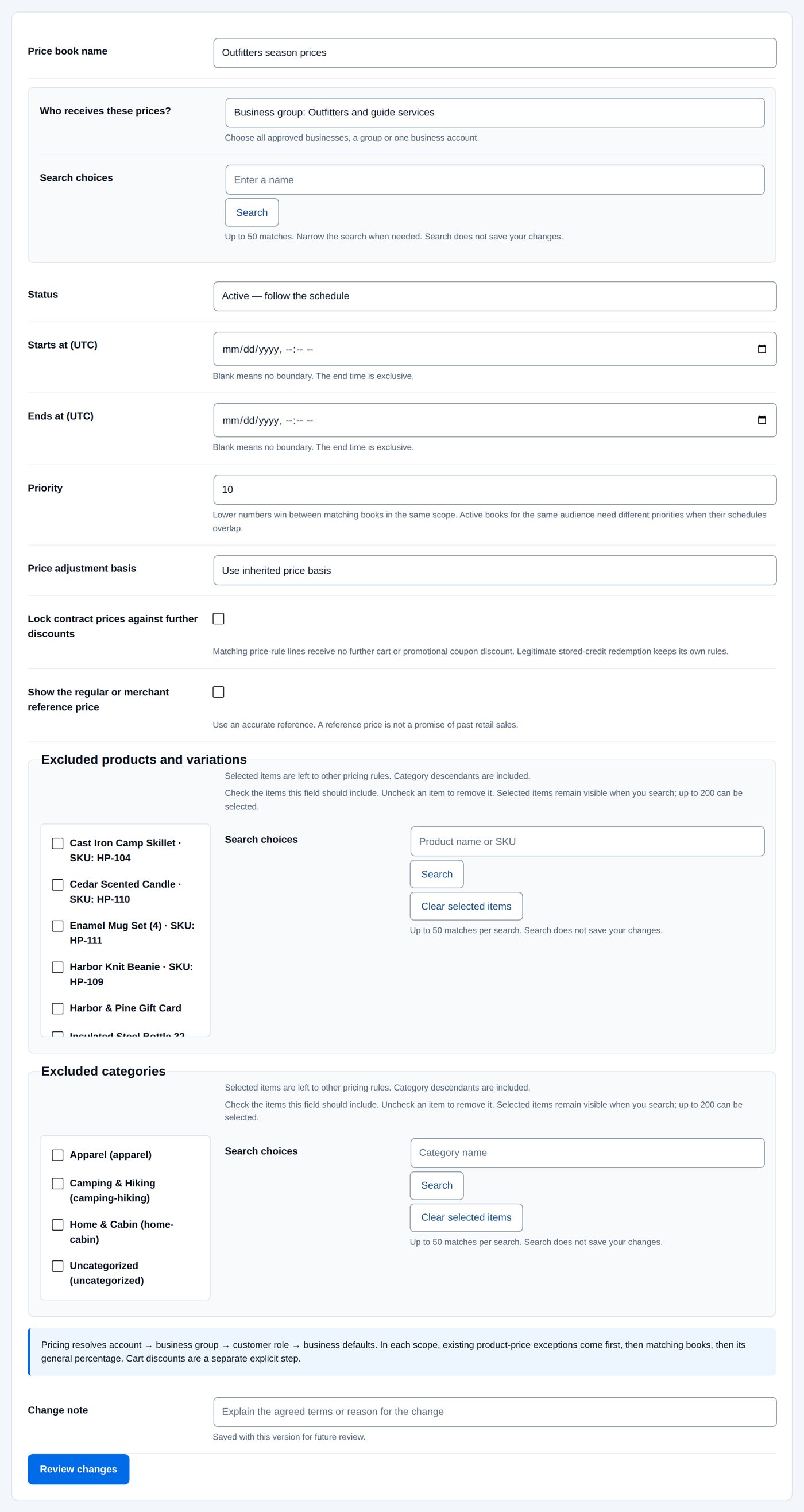
A price book is a set of business prices with a schedule, for example a contract price list for next season. Price books → Create a price book ("Start with an editable draft. Add rules, test them, then activate the book.") opens its sections: Details & schedule, Price rules, Cart discount, Coupon amounts, Customer guidance, Import / export and Version history.
Details & schedule:
| Field | At the start | What it does |
|---|---|---|
| Price book name | empty | e.g. the group, contract or season |
| Who receives these prices? | all approved businesses, a group or an account | |
| Status | Draft — does not affect prices | Active — follow the schedule, or Paused |
| Starts at (UTC), Ends at (UTC) | empty | "Blank means no boundary. The end time is exclusive." |
| Priority | 10 | "Lower numbers win between matching books in the same scope." Active books for the same audience need different priorities when their schedules overlap. |
| Price adjustment basis | Use inherited price basis | or Regular product price, Active sale price, otherwise regular |
| Lock contract prices against further discounts | not ticked | "Matching price-rule lines receive no further cart or promotional coupon discount." |
| Show the regular or merchant reference price | not ticked | shows a reference price next to the business price; "A reference price is not a promise of past retail sales." |
| Excluded products and variations, Excluded categories | none | left to other pricing rules |
| Change note | empty | "Saved with this version for future review." (on every section of a book) |
Price rules → Add a price rule:
| Field | What it does |
|---|---|
| Rule name / key | "A stable lowercase name such as dealer_lights. Published keys are kept for history." |
| Apply to | One product or variation, One category and descendants, or All ordinary products (with Product or variation or Category) |
| Price method | Exact unit price, Percentage off the price basis, Amount off each unit, Percentage added to the price basis, Amount added to each unit |
| How bands apply | Volume — one rate for all qualifying units or Graduated — each band keeps its rate |
| Count quantities across | Each exact product / variation, Variations of each parent product, All eligible products matching this rule, All eligible products in the cart, or Selected eligible products (tick them under Products counted when Selected eligible products is chosen) |
| Optional qualifying range: Minimum qualifying quantity, Maximum qualifying quantity, Minimum qualifying merchandise value, Maximum qualifying merchandise value | when the rule applies at all, counted on the products chosen above; "they do not prevent a purchase". 0 or blank means no boundary for quantities; for values, blank means none and 0 is a real boundary. |
| Quantity bands: Starting quantity, Ending value (optional), Unit price or adjustment | one row per band, in increasing order; Applies to shows the range ("1–11", "12 and above"). Add a band adds a row, Remove takes one away. Up to 20 bands. "Graduated prices start at 1, have no gaps and keep the last band open." |
| Merchant reference price (optional) | with comparison display on; "blank uses the regular product price" |
| Compare a product before publishing (optional) | a price check in the review, like the one for product prices |
| Remove this price rule | "The removal is reviewed before a new book version is published." |
The two kinds of bands, with 10.00 for pieces 1 to 9 and 8.00 from piece 10, for a buyer of 12 pieces:
| How bands apply | 12 pieces cost |
|---|---|
| Volume: the band reached sets the price of every piece | 12 × 8.00 = 96.00 |
| Graduated: each band keeps its own price | 9 × 10.00 + 3 × 8.00 = 114.00 (9.50 each) |
"Graduated prices require each exact product / variation."
The other sections:
- Cart discount: a percentage or fixed amount off once the cart reaches a number of pieces or a value, in bands.
- Coupon amounts: a business amount for an existing WooCommerce coupon (
code,5); the buyer still enters the coupon. - Customer guidance: what the buyer is told about quantity prices.
- Import / export: the rules as a file.
- Version history: every published change is a version you can review and restore.
Worked example: Outfitters season prices, $28 a mug set and $25 from 12 sets
The Enamel Mug Set costs $36.00. Outfitters and guide services (20% off, so $28.80) agreed $28.00 a set, and $25.00 a set from twelve sets, for the 2027 guiding season.
- Price books → Create a price book. Price book name "Outfitters season prices"; Who receives these prices? Business group: Outfitters and guide services; Status Active — follow the schedule; no start or end. Save the details.
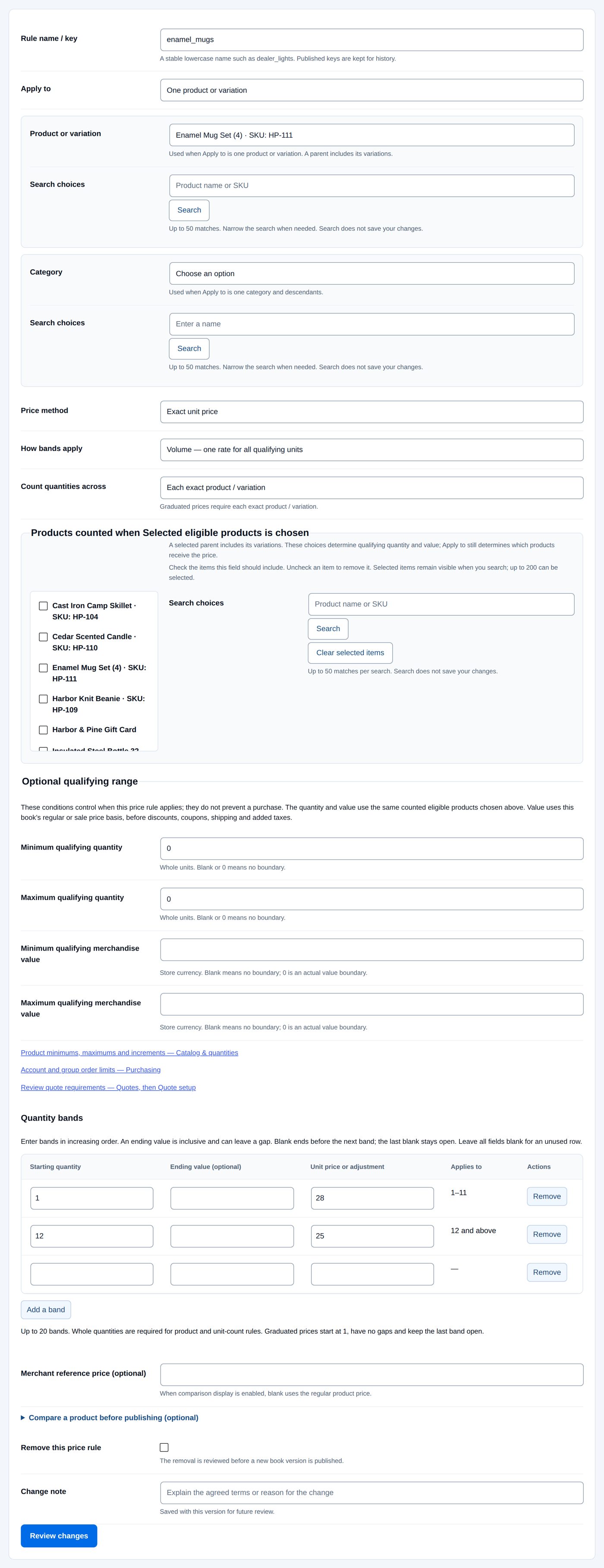
- Price rules → Add a price rule. Rule name / key
enamel_mugs; Apply to One product or variation, the Enamel Mug Set; Price method Exact unit price; How bands apply Volume — one rate for all qualifying units; Count quantities across Each exact product / variation; bands: from 1 → 28, from 12 → 25. Review and publish.
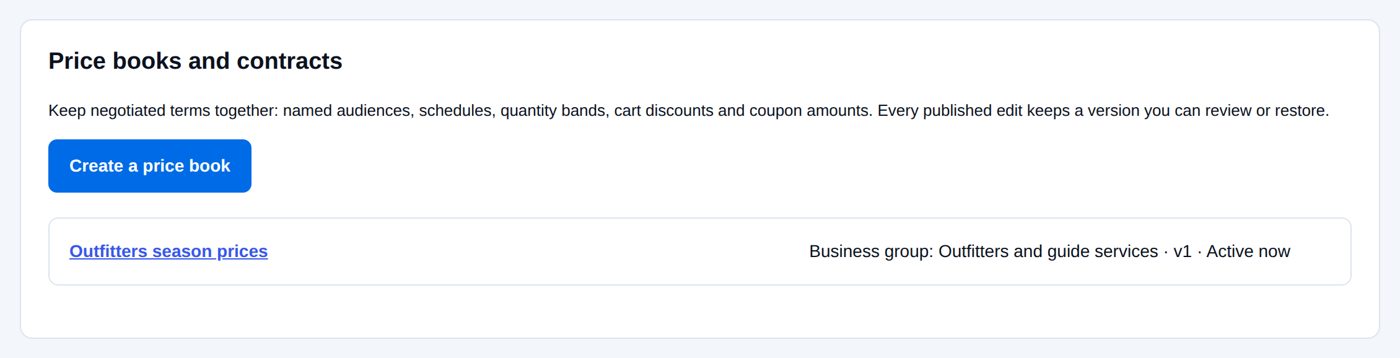
The list of Price books and contracts shows the book as "Business group: Outfitters and guide services · v1 · Active now".
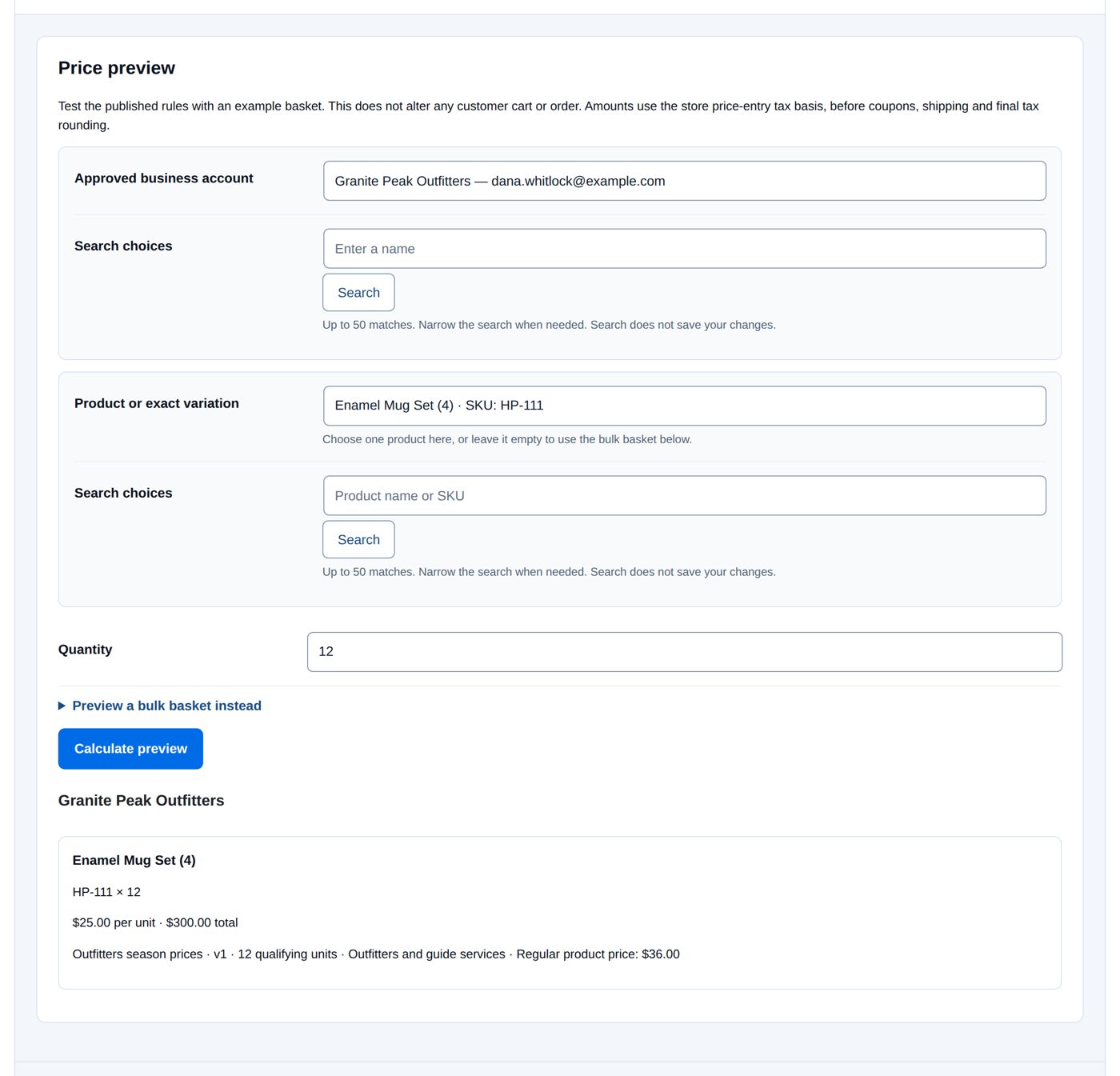
- Price preview: Approved business account Granite Peak Outfitters, Product or exact variation the mug set, Quantity 12, Calculate preview: "$25.00 per unit · $300.00 total" and where the price comes from: "Outfitters season prices · v1 · 12 qualifying units · Outfitters and guide services · Regular product price: $36.00".
Dana Whitlock of Granite Peak Outfitters puts twelve mug sets and one blanket in the cart: the sets at $25.00 from the book ("Business pricing: Outfitters season prices · v1 · 12 qualifying units"), the blanket at the group's 20% off ($118.00 → $94.40), $394.40 in all.
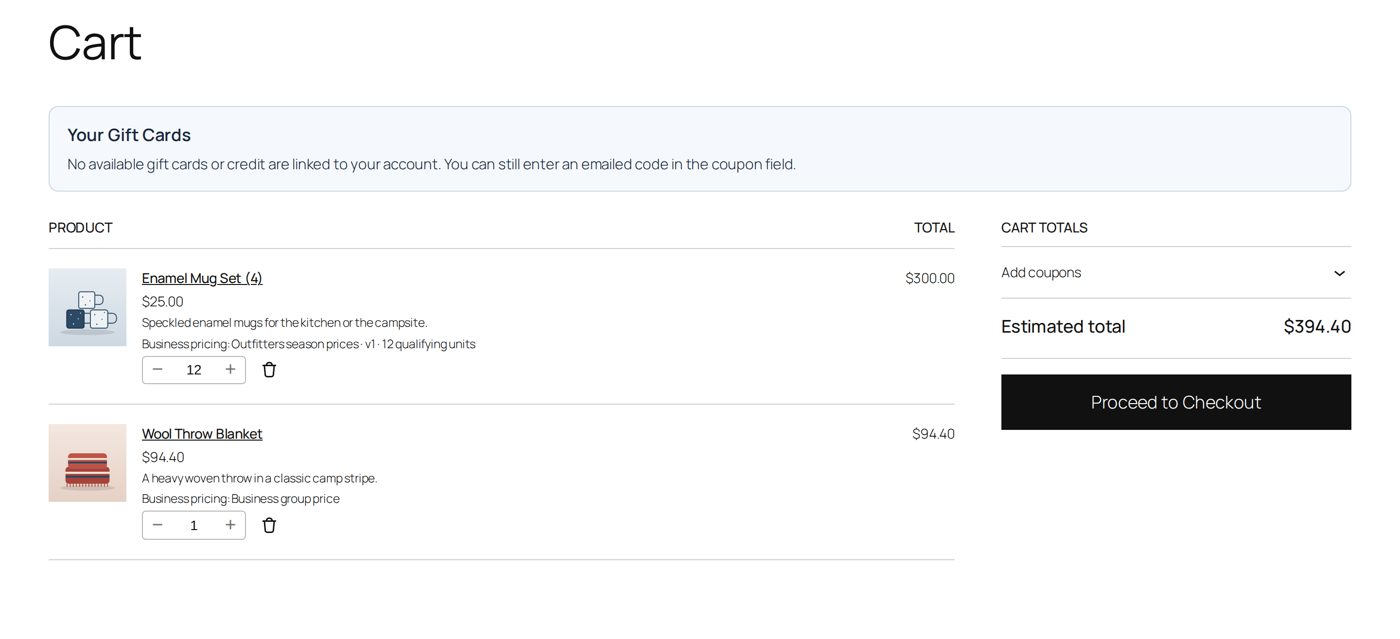
With eleven sets she would pay $28.00 each. A product price for the group's audience would come before the book.
Check before customers do
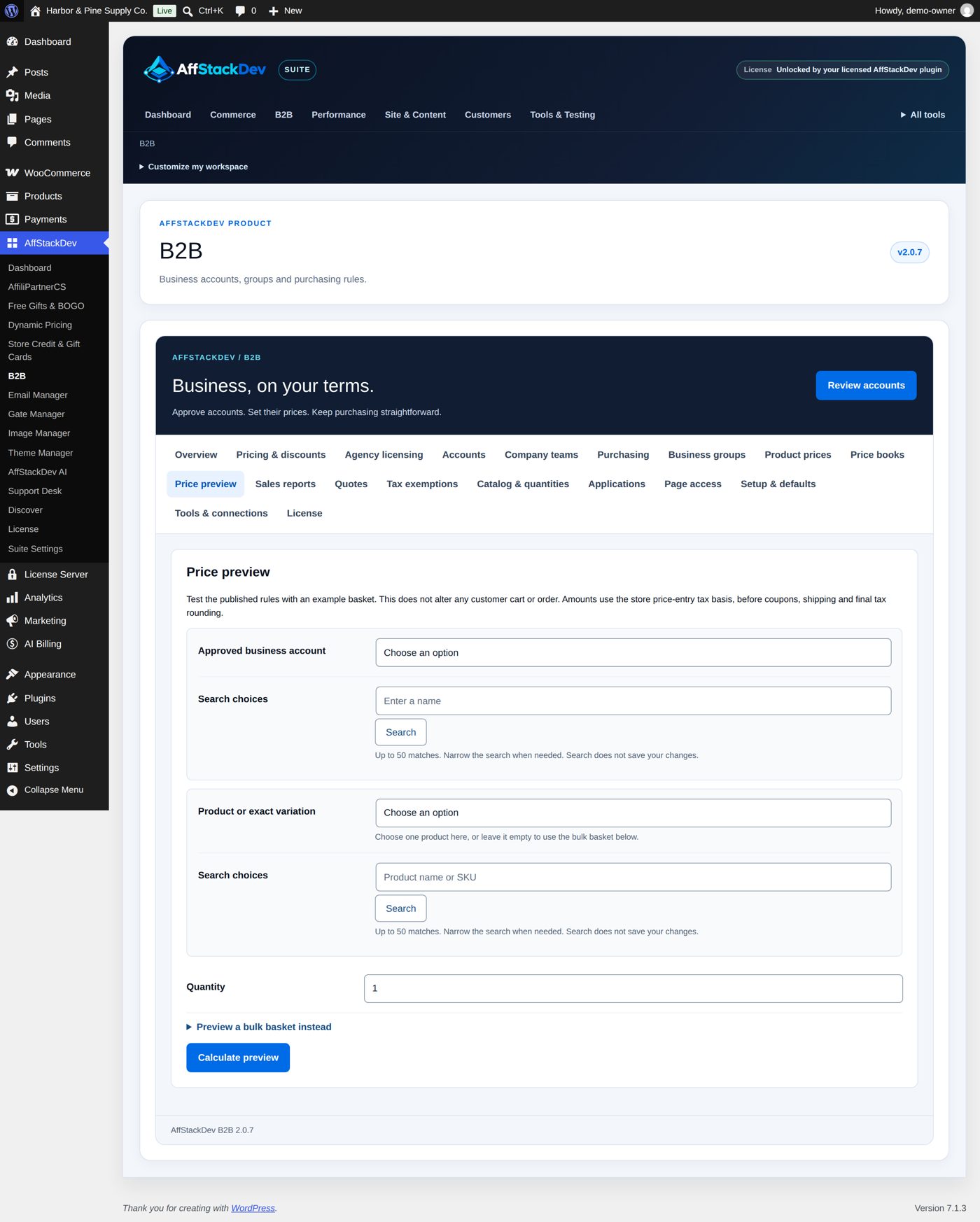
Price preview ("Test the published rules with an example basket. This does not alter any customer cart or order."): choose an Approved business account and a Product or exact variation with a Quantity, or open Preview a bulk basket instead and paste SKU, quantity lines. Calculate preview shows for each line the unit price and the total ("$25.00 per unit · $300.00 total") and where the price comes from (the price book or terms, the group and the base price). Amounts use the store's price-entry tax basis, before coupons, shipping and final tax rounding. "Price unavailable" means the product has no price or the account cannot receive business pricing.
Business customers and other offers
- Approved businesses get no consumer promotions: no Dynamic Pricing offers and no Free Gifts & BOGO gifts, also when their business discount is 0%.
- Only the coupon codes listed under Explicit business coupon codes work for business customers.
- Store credit and gift cards are payment; they work alongside business prices under Store Credit's own rules.
- An accepted quote has its own agreed prices for that one checkout (Quotes).
In another currency
With WPML Multilingual & Multicurrency for WooCommerce or FOX - Currency Switcher (with Is multiple allowed), a business customer who switches the shop to another currency keeps the business prices, converted at the switcher's rate: a 10% discount applies to the converted price, an exact price of $60.00 is €54.00 at a rate of 0.9. Everything you enter in B2B stays in your store currency, and limits and caps count the cart at the rate. Quotes are accepted in the store currency only. In a currency the switcher has no rate for, the customer is asked to switch the shop back to your store currency.
When a price is not what you expected
| You see | It means |
|---|---|
| A product price or book still wins over your new general discount | Intended: the more specific price comes first. Check with Price preview. |
| "Business terms changed while this form was open. Reload the terms and review them again." | Someone published these terms while you had them open. |
| "Business terms changed while you were editing. Reload and review the price book again." | The same for a price book. |
| "The product price changed while you were reviewing it. Reload and review the current record." | The same for a product price. |
| "This price was saved in a different currency. ..." | The store currency changed; enter the amount for the current currency and publish it again. |
| Two active books for the same audience share a priority and dates | Give them different priorities or dates, or pause one. |
| "Business pricing changed. Refresh the cart and review its current total." (customer) | Terms changed while the customer had items in the cart; refreshing the cart applies the new price. |
| "Price unavailable" in Price preview | The product has no price, or the account is not approved. |
Questions
Does a business price show for customers who are not approved?
No. Waiting, rejected and on-hold accounts and ordinary customers see your normal prices.
Can a group have a discount and a few exact product prices?
Yes: the product prices win for those products, the discount covers the rest.
Do price books replace the group's discount?
For the products the book covers, yes; other products keep the group's discount.
Can I schedule a price change?
Yes, with a price book's Starts at (UTC) and Ends at (UTC) and the status Active — follow the schedule.
What happens to orders already placed when I change a price?
Nothing. Each order keeps the price it was placed with.
Related pages
| Page | What it covers |
|---|---|
| Getting started | The default terms and business groups. |
| Business accounts | Approving an account into a group. |
| Who sees and buys what | Hiding prices, quantity rules, order limits, payment and delivery methods. |
| Quotes | Agreed prices for one order. |
| Working together | B2B with Dynamic Pricing, Free Gifts & BOGO and Store Credit. |